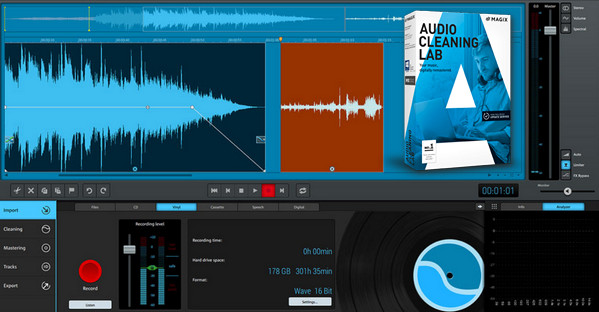
MAGIX Audio Cleaning Lab has been optimized down to the smallest detail for digitizing vinyl records and restoring audio recordings. Thanks to a combination of simple one-click solutions, an intuitive interface, and a range of professional tools such as spectral representation, rediscover your recordings in optimal audio quality.
The main functions:
* Removal of unwanted noise
* Various sound optimization presets
* Importing CDs to the computer and automatically adding album information such as title and cover art
* Volume adjustment & reduction of overmodulations
* Insertion of effects and audio commentary
* Optimized for touchscreens
* Importing and exporting audio files
An innovative and easy-to-use software:
Advanced effects editing for perfectionists
Digitize your vinyl records, apply effects, and discover detailed editing: optimize the sound of your recordings exactly as you want!
Digital remastering for music enthusiasts
Your music has never sounded so clear: perfect your vinyl records, magnetic tapes and cassettes using state-of-the-art mastering techniques and various automatic functions.
Recording optimization for journalists, presenters and others
Podcasters, cover all the news and achieve a professional result: optimize the clarity of specific passages with spectral cleaning, remove hissing or add filters to guarantee the charisma of recorded voices.
Configuration:
– Windows (x32/x64 Bits): XP, Vista, 7, 8, 8.1, 10
– Processor: Intel 3GHz
– RAM: 512 MB
– Disk space: 500 MB
Facility :
1- Execute: Audio_Cleaning_Lab_2017_en-II_160205_15-25_22_0_1_22.exe
2- Copy the file AMLab.exe in this directory:
C:\Program Files\MAGIX\Audio Cleaning Lab\22
- Language : English
- Size : 242.2 MB
This article was updated on December 3, 2016