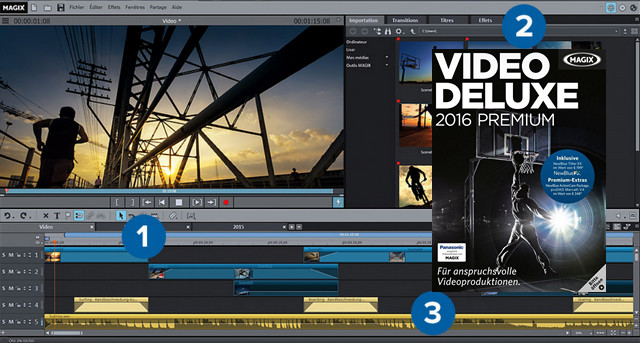
MAGIX Video Deluxe Premium offers 3D support for your video projects thanks to a wide range of features. You'll find, of course, the video editing tools already present in the standard MAGIX Video Deluxe version, such as customizable menus, 3D transitions, visual and sound effects, and Flash animations. In the Premium edition, everything has been redesigned to save you time, optimize storage space, and facilitate the export of your creations to DVD, Blu-ray, YouTube files, and other formats.
The Premium version brings together the best features of video editing: automatic image stabilization,
Ultra-fast CMOS correction and the complete NewBlue ActionCam Package. Create spectacular videos!
* High-level video editing
* Flexible arrangement
* The 99 available tracks offer you total creative freedom to easily edit your demanding video projects.
* Perfect staging
* Give your videos a personal touch with special effects, transitions, and intro and outro animations.
* Audio optimization
* Get impressive sound: eliminate unwanted noise and automatically adjust the volume.
The main functions:
-NewBlue ActionCam Package worth 99 Euros included
-proDAD Mercalli V4 worth 249 Euros included
-Faster work: unique performance thanks to the 64-bit format
-Frame-accurate video editing: on up to 99 tracks
-Editing function with proxies: edit smooth 4K & HD videos
-Multicam editing: for recording from 4 cameras simultaneously
-Secondary color correction: detailed modification of each color shade
-Creative design: special effects, transitions, intros/outros, etc.
-Wireless file transfer: with Movie Edit Touch for tablets
* System requirements for 3D editing
-A pair of red/cyan glasses is required for anaglyph 3D display.
-A specific screen is required for display with polarizing glasses.
-For Shutter display, a 120 Hz screen or projector and compatible LC shutter glasses and graphics card are required.
* Supported devices & file formats:
– Supported import/export formats:
Video: AVI, DV-AVI, MPEG-1, MPEG-2, MPEG-4, MTS, M2TS, MXV, MJPEG, QuickTime, WMV(HD), VOB, MKV (H.264 + AC3), HEVC/H.265
Audio: WAV, MP3, OGG, WMA, MIDI, Surround sound/5.1
Photo: JPEG, BMP, GIF, TIF, TGA
Compatible peripherals:
FireWire interface: for use with DV/HDV camcorders
USB port: for use with HD camcorders, cameras, digital video recorders and webcams
Video cards, TVs or graphics cards (with video input): for digitizing analog sources
Optical drives: Blu-ray, DVD-R/RW, DVD+R/RW, DVD-RAM or CD-R/RW burners
*Supported file extensions (import):
*.avi, *.dat, *.evo, *.m2v, *.m1v, *.h264, *.mpv, *.mpg, *.mpeg, *.mpg2, *.mps, *.mp2, *.mpe, *.m2s, *.vdr, *.vob, *.mod,*.vro, *.ts, *.trp, *.tp, *.m2t, *.mpt, *.mmv, *.m2ts, *.mts, *.tod, *.mov, *.mp4, *.dvr-ms, *.asf, *.pva, *.mp4, *.mpeg4,*.mpeg-4, *.m4v, *.3gp, *.3g2
System OS:
Windows: XP SP3 / 7 / 8 / 8.1 / 10
Technical Configuration:
* Processor / Minimum: 2.4 GHz
* RAM / Minimum: 2 GB
* Graphics card / Minimum: Integrated, minimum resolution of 1280 x 768
* Hard drive space / Minimum: 2 GB for program installation
Facility:
1- Install the software.
2- * Replace “Videodeluxe.exe” in the installation folder.
* Replace "Protein_x64.3.10.dll" in the Protein folder.
3- Open the program. Click on Close (button on the right) when the activation appears.
4- It's activated. The program is working in full mode.
- Language: French
- Size: 459.85 MB
This article was updated on July 21, 2016