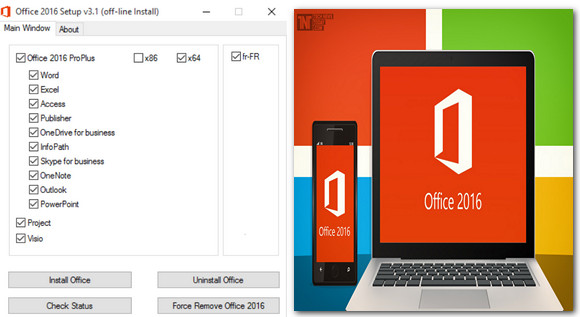
Office 2016 is finally here. The world's most famous office suite is being modernized to meet the needs of today's users thanks to full cloud integration and the ability to create documents on any device: computer, mobile or tablet.
A star product, refined to perfection
With Office 2016, Microsoft does not claim to revolutionize its flagship product, but rather to improve the elements already introduced in the Office 2013 version. These improvements are mainly aimed at collaborative work, regardless of the platform used, and adaptation to today's needs.
Among the major new features introduced in the 2016 version, we must mention the complete and seamless integration of software with OneDrive, which was only partially implemented in the previous version, and the ability to collaborate remotely on documents in real time. Users can now view changes made by their colleagues from their own computers.
The new power of the software suite
Word 2016 doesn't bring any major new features aside from those related to collaborative work and direct access to OneDrive. But that's already a lot, as real-time collaboration proves useful in both Word 2016 and PowerPoint 2016.
Excel 2016, one of the most popular programs in the suite, features a new, simplified menu, even though the interface remains largely unchanged from the 2013 version. But be warned: while the changes may not be immediately obvious, those who handle large volumes of data will be pleased to see that Microsoft has enhanced its Business Intelligence capabilities through utilities that, until now, were only available separately. These add-ons include Power Query and Power View, which are used to search for data in depth and generate reports.
Outlook 2016, however, is surprising in its focus on the truly essential aspects of email. For example, Microsoft has added features designed to achieve that coveted "empty inbox." In this respect, Outlook intelligently filters your emails and forwards less important ones to secondary folders.
In the Windows version, the Outlook 2016 function ribbon works differently: rather than constantly displaying available options, they remain hidden until you click on the corresponding tab. A whole host of new charts and tables are now just a click away, including TreeMap, Sunburst, Waterfall, Box & Whisker, and Histogram & Pareto.
The major change lies in the replacement of Lync with Skype for Business, which offers business users a new, more streamlined automated messaging system integrated with the other tools in the software suite. For example, you can share documents during a video conference or comment directly with your contacts on the work being done in real time on your desktop.
In fact, many of the improvements aren't immediately visible to prevent data from being directly accessible should Office documents fall into the wrong hands. This is particularly true for accessibility and performance enhancements.
The best is yet to come
Taken as a whole, the changes brought by Office 2016 are minor and, aside from the "Tell us what you want to do" assistant, they aren't really noticeable to the average user. Most of the new features, such as the BI improvements for Excel, are aimed more at an expert audience, even if the shortcomings of Outlook 2016 compared to its Mac version are somewhat unclear. Let's hope Microsoft tells us more before the official release of Office.
Configuration:
– Windows (x32/x64 Bits): 7, 8, 8.1,10
– Processor: Pentium 1 GHz
– RAM: 1 GB
– Disk space: 4 GB
Facility :
0. Launch the 016Setup.exe
1. Select the desired versions and start the installation.
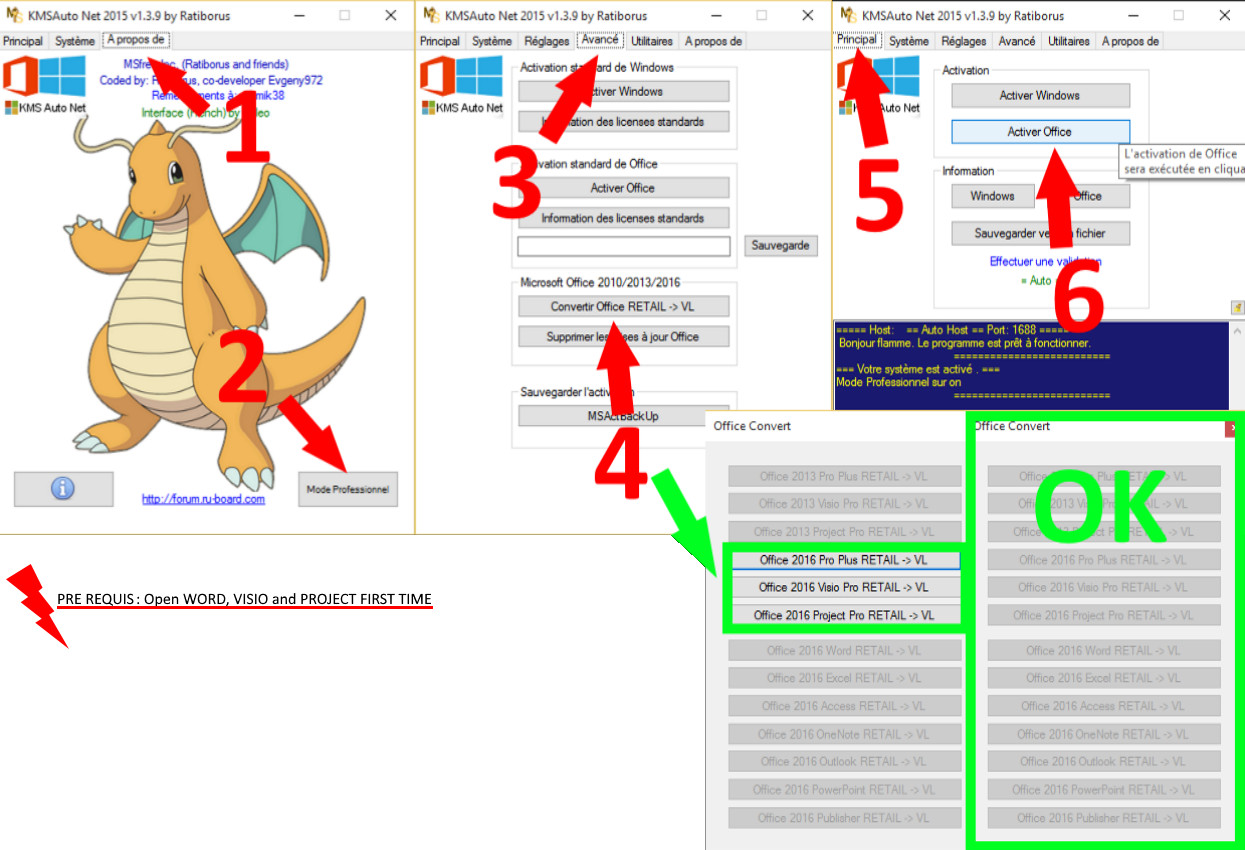
2. Open Word, Project, and Visio at least once
3. In tools ==> KMSAuto-Net-2015-v1.3.8 ==> KMSAuto Net.exe
4. Click on Advance Then Convert Office RETAIL -> VL
5. Convert them by clicking on the non-greyed buttons.
6. Come back later to main and click on Activate Office
- Language : French
- Size : 2.3 GB
This article was updated on August 9, 2019