Microsoft Office 2016-2019-2021 brings new features and updates to on-premises applications for both users and IT professionals. Office 2016-2019-2021 provides a set of valuable enhancements for customers who cannot connect to the cloud or receive regular updates.
The new enhancements in Office 2016-2019-2021 are a subset of a long list of features, including innovations in collaboration, artificial intelligence (AI), security, and more. You can also use Microsoft Office LTSC.
These programs are included in Microsoft Office 2016-2019-2021 Professional Plus
Microsoft Access 2016-2019-2021
Microsoft Excel 2016-2019-2021
Microsoft Lync 2016-2019-2021
Microsoft OneNote 2016-2019-2021
Microsoft Outlook 2016-2019-2021
Microsoft PowerPoint 2016-2019-2021
Microsoft Publisher 2016-2019-2021
Microsoft Visio Viewer 2019-2021
Microsoft Word 2016-2019-2021
Microsoft Visio pro 2016-2019-2021
Microsoft Project Pro 2016-2019-2021
Skype for business 2016-2019-2021
OneDrive for Business 2016-2019-2021
Office Shared Features
Profing Tools Only 2016-2019-2021
And much more…
Microsoft Office 2016-2019-2021 Professional Plus Installation
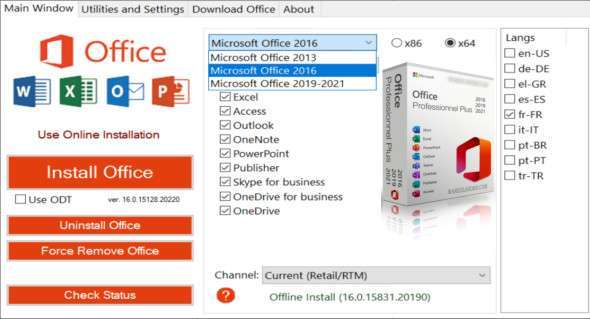
1. Run OInstall.exe, select the desired version of Microsoft Office (2016-2019-2021), select the desired language, and choose the programs to install.
2. Click 'Install Office' and wait for the installation to finish.
3. In the 'Utilities and Settings' tab, click on 'Office RETAIL => VL', then on 'Activate Office'
Version : 2304 Build 16327.20214
Language : Multilingual (French included)
Size : 6.40 GB
Configuration:
– Windows (x64 Bits): 7, 8, 8.1, 10, 11
Microsoft Office Pro Plus 2016-2019-2021 Apr 2023
This article was updated on May 2, 2023