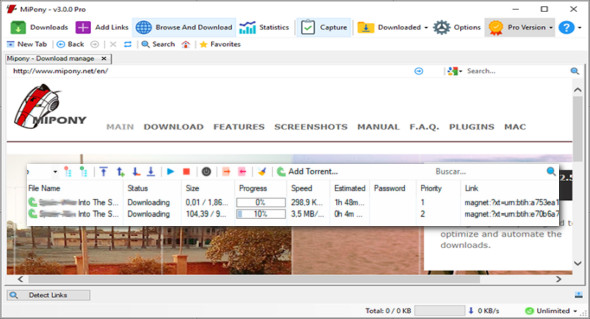
Mipony Pro is a download manager that gives you access to content on a wide variety of websites. You can then save it to your computer or mobile device. Thanks to the application's intuitive interface and integrated browser, you can quickly find the items you're looking for and begin the download process. You can also use Internet Download Manager.
Continuous downloading with Mipony Pro
– Once the link is added to the download list, the files will be downloaded, and if you close the download program, the downloads will restart when you restart the program.
– Option to prioritize files in the waiting list
– Control the number of files that can be downloaded simultaneously from each server.
– Most files hosted on free servers are split into several parts. Mipony has the ability to join downloaded files (HJSplit).
– Mipony can capture individual links or any text containing any number of links into the clipboard.
Browser:
– It has a built-in browser with download link detection.
– Automatic database updates with supported sites. Mipony automatically updates itself to continue working with file download sites and constantly adds new sites to the list of supported websites.
– Mipony can analyze entire sites looking for links, indicating whether they are still available on the server to download or if they have been deleted.
– It allows the Flashgot configuration to send links to Mipony
Control :
Mipony has a web interface for remote control. With the web interface, you can view and manage downloads, as well as enter CAPTCHA codes remotely. The web interface design is optimized for both desktop and mobile devices.
Captcha Trader Plugin:
– With this plug-in, you will have access to the captcha decoding system developed by captchatrader.
Version : Pro 3.2.2
Language : Multilingual (French included)
Size : 26.03 MB
Configuration:
– Windows (x32/x64 Bits): 7, 8, 8.1, 10, 11
Mipony Pro 3.2.2
This article was updated on May 24, 2022