Mirillis Action 1.30.3 is a fast video capture program offering good image quality. It is also suitable for audio recording. This program can record streaming video, even HD. It also allows you to save gameplay footage if needed. Action! has a special option for screen capture.
New features in version 1.30.3
IMPORTANT: Remote action! This service is now free for all users.
Fixed video recording on Normal (non-Admin) user account
stability improvement
New feature: DirectX 12 game and recording application support added
IMPORTANT live streaming improvements
Windows 10 improvements
Still screenshot capture for 10-bit games and applications
Improved stability…
IMPORTANT: Live service is now free for all users
New feature: Adaptive/variable framerate video recording/Records webcam previews in action! HUD added
MP4 video recording software unlocks up to 4K resolution
Fixed audio/video synchronization for MP4 video recordings (fixed issues with audio/video speed and other synchronization problems)
Fixed an issue with video recordings being too short in MP4 format / Fixed MP4 video recording stability / Fixed OpenGL stability for recording games and applications
Improvements for webcam recording
User interface improvements (remote action! moves to a separate tab)
New webcam and microphone recording mode: The button pressed (ON/OFF)
Removing "Delete all files" from the records manager
Added keyboard shortcuts for the record manager (CTRL A, etc.)
Action! enables real-time streaming and recording of your Windows Aero desktop in stunning HD video quality. With Action! you can record and stream your gameplay, web player videos, record music, take screenshots, remotely access your PC, play PC games with Android devices… and much more!
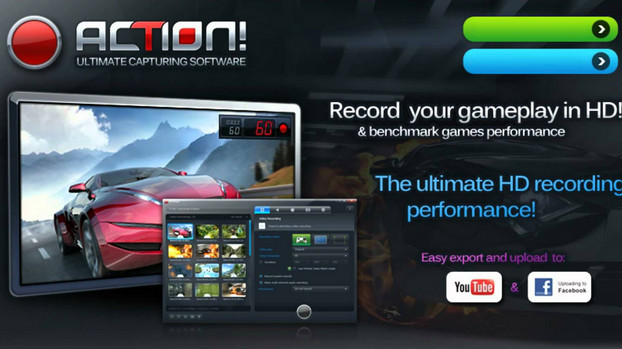
Record your gameplay in HD.
With Mirillis Action you can record gameplay videos, your desktop, applications, and even web browsers. It's an excellent alternative to Camtasia Studio thanks to its comprehensive features and ease of use.
Action! is optimized for capturing video from titles that use OpenGL and DirectX in HD quality. You can show or hide the current and average frames per second on the screen to see how fast you're recording. This way, by minimizing CPU resource usage, you'll get a high-quality clip.
Action! Live Streaming service allows you to record all your gameplay, videos or office activities for popular streaming services like Twitch.tv, YouTube, Ustream, Livestream, live live.
This program will also record everything that happens on your desktop or in any application you're using. Furthermore, you can configure Mirillis Action to capture only what happens in the active window or on a specific part of the screen. You'll even be able to record clips from any web player, regardless of the service.
Create custom tutorials
Mirillis Action is ideal for creating guides for complex games or applications. You'll be able to demonstrate your knowledge to any user and help others use your favorite programs.
To begin, this program allows you to input audio through the speakers and voice directly through the microphone. This way, you can comment on your actions as you perform them, resulting in a clear and well-synchronized outcome. Furthermore, Action! can capture text input and cursor movement to ensure your audience doesn't miss a thing.
Furthermore, this application doesn't just record video. You'll also be able to take screenshots and save them for later editing. This allows you to create accessible, visual tutorials.
Compare your creations
A very convenient feature of Mirillis Action is its ability to export videos directly without leaving the program. You'll be able to send your clips to services like YouTube or Facebook, using default profiles. This eliminates the need to manually adjust the format or resolution, as Action! will handle it for you.
Furthermore, you will have profiles available for various devices such as mobile phones, iPods, iPads, iPhones, PSPs, PlayStation 3s, etc. The size, quality, resolution, and format will be automatically adjusted to suit the output device. This means you will be able to enjoy your video anytime, anywhere.
High performance and ease of use
Mirillis Action's interface is very well organized and divided into sections. You'll be able to manage your recordings and screenshots to properly organize your collection. You can also move or delete files from your library and computer when you no longer need them. Furthermore, you'll have the option to change formats and view profiles for different devices.
Mirillis Action includes a built-in player that lets you view your collection without leaving the program. You'll enjoy your videos with excellent picture quality, and you can even create playlists.
On the other hand, Mirillis Action stands out for its excellent performance when recording HD video. Because it's optimized to work with multiple processors, it can capture real-time footage with higher quality than other applications. Furthermore, it saves clips in its own format: FIC, a compressed format that doesn't degrade image quality.
Video recording with dual-screen webcam
With Action! you can add up to 2 webcam feeds to all your real-time gameplay and desktop recordings! Share more than just your facial expressions! With Action!, webcam recording is easy: simply select your webcam, its video position and size, and start recording.
Support for Logitech G13 / G15 / G19 multimedia keyboards
Action! delivers the ultimate experience for pro gamers with Logitech G13/G15 or G19 multimedia keyboards. With Action! and Logitech's LCD keyboard screen, you can monitor game FPS or screen recording, average FPS, recording time, free disk space, and more. All displayed with a clean and elegant interface.
Recording of desktop and games in 4K!
Action! supports a wide variety of high video recording resolutions, from 2K, 3K, 4K video recording for single displays (supports MP4 and AVI file formats) up to over 8K (supports AVI file format) for AMD Eyefinity or NVIDIA 3D vision setups.
Action! Remote control for mobile devices with Android!
Action! Remote control app lets you monitor and control your gameplay and screen recordings with Android mobile devices!
Configuration
– Windows/ Vista /7/8/8.1/10 (with Windows Aero active for desktop recording) DirectX and the latest graphics card drivers for racing action! Requires administrator rights.
– RAM MEMORY: 512
– GRAPHICS CARD: Direct3D 9.0 compatible with Shader support Pixel 2.0
– SOUND CARD: DirectX compatible
– CPU: Intel Celeron 1.4 GHz processor or equivalent processor (SSE2 required)
– Intel Celeron 1.4 GHz processor or equivalent processor (SSE2 required)
Facility
IMPORTANT: DISABLE YOUR INTERNET CONNECTION BEFORE STARTING THE INSTALLATION
0) Disconnect from the internet: Control Panel > Network and Sharing Center > Local Area Connection
Uninstalling your old version before installing this one also means deleting all folders and Action files present in the Mirillis folder on your PC.
IMPORTANT: Delete the action folder in these locations.
Start -> search, type regedit, then left-click to open regedit, then go to:
HKEY_CURRENT_USER > Software > Mirillis > action
C:>Users>pc name>AppData>Local>Mirillis>Action
C:>Users>pc name>AppData>Roaming>Mirillis>Action
C:>Program Files (x86)>Mirillis>Action!
C:>ProgramData>Mirillis>Action
or use Total Uninstall
1) Install Action! with the setup «
Please note that with this new version it is not possible to choose the installation directory.
2) Launch action with your disabled connection
3) Click About window » by clicking on ?? the orange activation button with a key drawing.
In "About Window", select the "Activate" tab to display the activation page.
Enter the name and serial number found in the Mirillis action 1.27.2 note .txt file.
Successful activation will be confirmed by a window displaying the message "Activation complete".
Do not update. In settings, leave unchecked.
» check the availability of the application »
» Launch action at Windows startup »
IF A BLACKLISTER KEY IS USED, an activator will be located in the activator folder.
IMPORTANT: DISABLE YOUR INTERNET CONNECTION BEFORE STARTING ACTION. If the software is blocked, read the .txt file.
0 ) -> C:\Windows\System32\drivers\etc\hosts
If it asks for administrator rights, copy your hosts file and paste it onto the desktop.
Open it by right-clicking > open with… using Notepad or Blocnote (uncheck the box "Always open this type of file…").
Add the following lines:
127.0.0.1 thislineskipsanyemptylines
127.0.0.1 mirillis.com
127.0.0.1 www.mirillis.com
127.0.0.1 server2.paka-service.com
127.0.0.1 ns386119.ovh.net
127.0.0.1 mirillis.pl
close and save
- Language: French / English
- Size: 34.11 MB
This article was updated on July 21, 2016