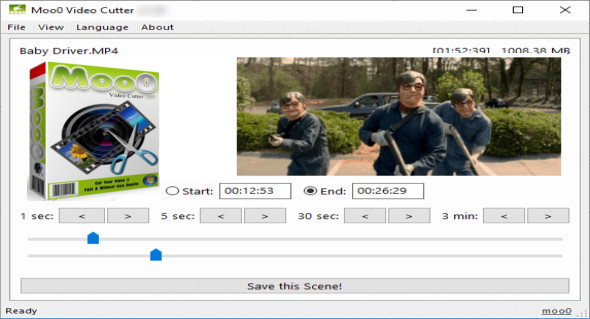
Moo0 Video Cutter is an intuitive video editing application that can be used to extract scenes from your movies. It offers a quick way to trim your videos and save the scenes to your computer.
Moo0 Video Cutter It provides a quick way to trim your videos and generate shorter clips. By doing so, you can save a significant amount of storage space on your hard drive, as well as remove boring or unnecessary parts of your movies, such as long introductions or end credits.
With this app, trimming videos is easy for both beginners and experienced users. You can specify the start and end times either by entering them manually or by using the convenient navigation tools to advance by 1, 5, 30, or 180 seconds. Alternatively, the start and end times can be adjusted manually using the navigation bars.
This program features a simple interface and supports most common video formats, such as AVI, FLV, MKV, MOV, MP4, MPG, OGG, WMV, M4V, OGV, WEBM, TP, TS, RM, and more. Helpful navigation options and drag-and-drop support make Moo0 Video Cutter easy to use. It's an excellent tool for those looking for a quick and easy way to cut their video files without having to deal with complicated options.
Version : 1.17
Language : Multilingual (French included)
Size : 21.19 MB
Configuration:
– Windows (x32/x64 Bits): XP, Vista, 7, 8, 8.1, 10
– Processor: 1 GHz
– RAM: 1 GB
Moo0 Video Cutter 1.17
This article was updated on July 26, 2019