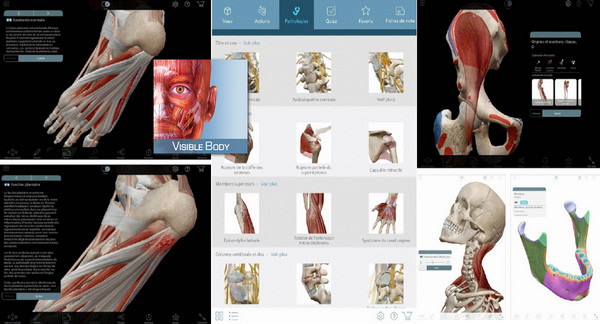
– A completely different look: a new user interface giving you quick access to dozens of frequently searched views, plus three ways to create custom views from a single touch on the screen.
– Thousands of 3D models of muscles, bones, ligaments, bursae, nerves, and arteries illustrating normal anatomy. The models include definitions, pronunciations, bony landmarks, muscle attachment sites, innervation, and blood supply.
– Animations of muscle actions. Use the zoom, pan and rotate tools and study the muscles from different angles.
– Hundreds of practice questions.
– Now with step-by-step presentations of more than 20 common pathologies in 3D: sciatica, rotator cuff tear, carpal tunnel syndrome, shin splints and much more!
– The app is available in 7 languages.
Here are the answers to the most frequently asked questions about Muscle Premium.
1. How is this app different from the General Anatomy Atlas?
– You can access and bookmark detailed content relating to muscles and bones (attachment points, insertion areas and bony landmarks) in various ways.
– The app offers dozens of models of common musculoskeletal injuries and conditions, including:
– Cervical spondylosis
– Cervical radiculopathy
– Lateral epicondylitis
– Carpal tunnel syndrome
– Rotator cuff tear
– Acetabular labrum tear
– Hip osteoarthritis
– Sprained knee
– Meniscus tear
– Osteoarthritis of the knee joint
– Achilles tendonitis
– The entire content is organized specifically for healthcare professionals or students treating or studying common functions and conditions affecting the musculoskeletal system.
2. How is the content organized? Is it easy to find what I'm looking for?
The content is organized by type (3D models, interactive animations, pathologies and quizzes) and by body region (head and neck, upper limbs, shoulder, abdomen, spine and back, pelvis and lower limbs).
You can observe more than 600 muscles, more than 200 bones, ligaments, bursae and peripheral nerves.
Study muscles in motion that you will choose from the library of muscle animations.
Study over 1,000 markers of origins and insertions on muscles and bones. Colors are applied to bones to illustrate muscle attachment areas.
Test your knowledge by taking quizzes related to the anatomy of muscles and bones.
3. How can I configure Muscle Premium to suit my needs? Is the app customizable?
Yes! You can customize the views by adding anatomical structures of your choice from various body systems. You can also hide other elements. Furthermore, you can annotate your views and share them.
With a touch of your finger, create a library grouping your favorites.
Use the Notes function to annotate your images.
Export your screenshots: use them in presentations or share them with your colleagues, students, or patients.
Share your favorite views with other Muscle Premium users.
Muscle Premium is recommended by physiotherapists, sports coaches, massage therapists, and orthopedic specialists..
Facility :
1- Copy the provided file " com.visiblebody.musclepremium » at the following location./android/obb
2- As a reminder: this folder is "normally" located (depending on the smartphone) on the internal memory…
– If it doesn't exist, create it. – If you experience difficulties copying, copy it elsewhere (SD card or other…)
– Using your browser or equivalent, I strongly advise you ==> ES Explorer Free on the Play Store, navigate to the chosen location and then simply copy it into the relevant folder (./android/obb)
3- Copy the app (apk) on your SD card (internal or external, depending on your settings and capabilities) and install
4- Launch the app & enjoy
- Version : Complete
– Compatibility: Android 2.3 or higher
- Language : Multilingual
- Size : 405 MB
This article was updated on November 15, 2016