Speed up your PC and turn unnecessary data into valuable disk space for your holiday photos, videos, and favorite songs.
Functions:
TO OPTIMISE
– Accelerated system startup and shutdown
Unnecessary startup programs are disabled. This allows you to start and shut down Windows in record time.
– Improved hard drive access
You can optimize the storage and data capacity of the hard drive and thus increase read and write speeds.
– Optimizing PC energy consumption
mytuning utilities offers one-click adjustable settings to reduce power consumption. Background tasks are reduced, while power consumption for the processor and hardware is minimized.
TO CLEAN
– Destruction of browsing history in the browser
Reduce browsing traces in major browsers and protect your online privacy. Supported browsers include Internet Explorer, Google Chrome, Firefox, Safari, Opera, Flash, and Silverlight.
– Removal of unwanted data
Installation remnants, history, error reports, and other unnecessary data don't stand a chance with mytuning utilities. Unnecessary data is deleted and transformed into usable storage space for your data.
– Reliable permanent erasure
mytuning utilities guarantees the permanent and secure deletion of private and sensitive data. The data is overwritten multiple times and cannot be recovered after the process.
DELETE
– Archiving of rarely used programs
Programs that are rarely used are archived, meaning their priority is reduced so that all background processes are stopped. They remain immediately available should you need them.
– Removal of unused programs
Not only does mytuning utilities help you remove unnecessary data, but it also shows you which programs are no longer in use and makes it easy to completely remove them from the system (including registry and autostart entries).
– Detection of large files
In just a few clicks, you can get an overview of the largest files and programs monopolizing your disk space and easily reclaim the corresponding space through targeted deletion.
FIX
– Reordering of the register entries
Registry entries are analyzed and problems detected are corrected. Unnecessary entries from uninstalled programs and references that are no longer required are removed.
– Hard drive error detection and repair
mytuning utilities analyzes the following areas of your hard drive: sectors, folder and file structure, indexes, storage, and NTFS permissions. Any errors are corrected, and incorrect references are removed. This process prevents disk failures and read/write errors.
– Recovery of accidentally deleted data
With just a few clicks, you can restore files you didn't want to delete in mytuning utilities, even if you've already emptied the recycle bin and regardless of the storage medium (internal hard drive or external memory). This does not apply to files you permanently deleted using the mytuning utilities shredder.
PC MODE
– Airplane mode
With one click, all wireless components such as Wi-Fi and Bluetooth are disabled. This allows you to save energy and use your PC during a flight for work, gaming, or watching movies.
– Economy mode
You can switch to a very special power-saving mode with a single click. Energy-intensive background processes and CPU and hardware power consumption are minimized. The result: your PC's battery life is extended.
– Turbo mode
Is your PC freezing or crashing during games? Is Windows too slow for you to use multiple applications simultaneously? Switch to Turbo Mode with a single click. Everyday functions you don't need right now are disabled, freeing up all available resources for your programs.
– Analysis at the start of the program
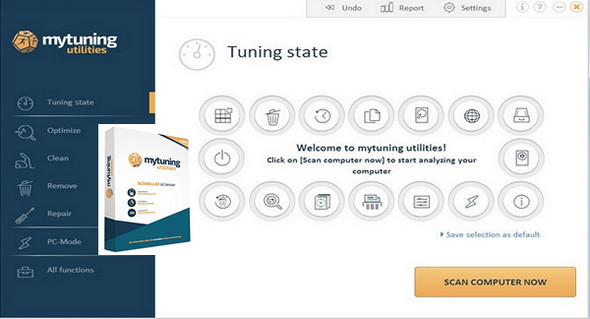
When you start the program, you can perform all important tuning functions simultaneously with a single click. Even better: if you wish, you can configure mytuning utilities to perform maintenance automatically when you start it.
Configuration:
– Windows (x32/x64 Bits): XP, Vista, 7 SP1, 8, 8.1, 10
– Processor: 3GHz
– RAM: 1 GB
– Disk space: 100 MB
Facility :
Portable version, run the file MyTuning.exe
- Language : Multilingual (French included)
- Size : 55.6 MB
This article was updated on February 2, 2017