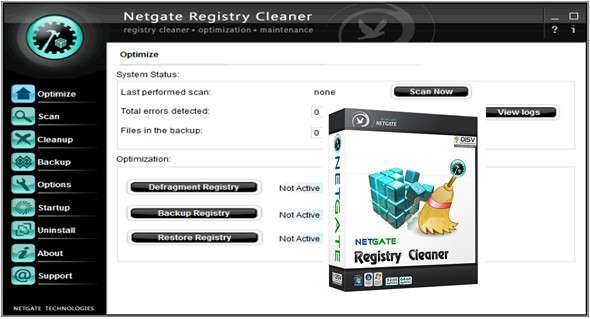
NETGATE Registry Cleaner is an application designed to help you fix invalid Windows registry entries, thereby improving your computer's performance. The tool's interface is clean and professional. The application can scan numerous areas of the Windows Registry, such as unused file extensions, ActiveX and COM issues, missing or invalid type libraries, and spyware entries.
In addition to this, the tool can be configured to clean the disk (e.g. invalid startup menu items, Internet Explorer cache, Windows temporary files, Recycle Bin) and to remove traces from your system (e.g. recent documents list, Start Menu, MS Office Recent Files, Internet Explorer cookies and typed URLs).
Once the scan is complete, you can see the total number of registry entries, cookies, and files scanned, the errors detected, and the elapsed time. This allows you to select the issues you want to resolve and let NETGATE Registry Cleaner handle the rest.
In addition, you can back up and restore data, manage applications that run automatically at system startup, uninstall programs from your computer, and schedule tasks (once or regularly). You can also have NETGATE Registry Cleaner run automatically at Windows startup, enable safeguards (e.g., startup programs, the Internet Explorer search page), and configure settings for the proxy and Internet Explorer search pages.
The program requires a low to moderate amount of CPU and system memory, has a good response time, quickly completes scanning and cleaning tasks, and includes user tips. NETGATE Registry Cleaner did not freeze or crash. Novice users may need some time to familiarize themselves with the application's features.
Features:
– Registry defragmentation
– Backing up and restoring the registry
– Startup Manager – manages all applications that start when Windows starts
– Uninstall Manager – a handy tool for quickly uninstalling applications from your system
– Backup – all deleted items are stored in the backup until permanent deletion; it can be restored at any time.
– Scheduling support – cleaning can be scheduled for the specified time
– Multilingual translation support
– Skin support
– Premium Technical Support
– Registry Shield Protection – protects the browser's homepage from changes, etc.
Registry cleaning:
– Missing shared library
– Unused file extension
– Invalid ActiveX/COM
– Invalid type library
– Open with application
– Edit with the application
– Print with care
– Application paths
– Missing help file
– Installer reference
– Uninstalling the entry
– Software installations
– Entry at startup
– MUI Cache
– Invalid Open/Save entry
– Old StartMenu Input Command
– Invalid default icon
– Invalid/empty class
– Library of missing types
– Empty keys
Disk cleaning:
Invalid desktop icon
Invalid StartMenu item
Internet Explorer cache
Firefox cache
Opera Cache
Google Chrome cache
Windows Temp
User temperature
Basket
Java Cache
Trace removal
– List of recent documents
– StartMenu Launch List
– List of recent files in Windows Media Player
last visit
– OpenSave files
– MS Paint – Recent Files
– MS Wordpad – Recent Files
– Typed Internet Explorer
– Passwords saved in Internet Explorer
– Firefox saved URLs/passwords
– Firefox History
– Research Assistant
– Firefox Cookies
– Opera cookies
– Internet Explorer Cookies
– Recent MS Office files
– MS Word – Recent Files
– MS Excel – Recent Files
– MS PowerPoint – Recent Files
– Recent Adobe Reader Files
– Nero Burning ROM Recent Files
– DirectX recent applications
– Recent QuickTime movies
– RegEdit Last key
– Recent clips from RealPlayer
Configuration:
– Windows (x32/x64 Bits): XP, Vista, 7, 8, 8.1, 10
– Processor: 1 GHz
– RAM: 1 GB
– Disk space: 20 MB
Language Multilingual (French included)
Size : 7.8 MB
This article was updated on January 6, 2018