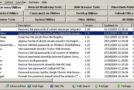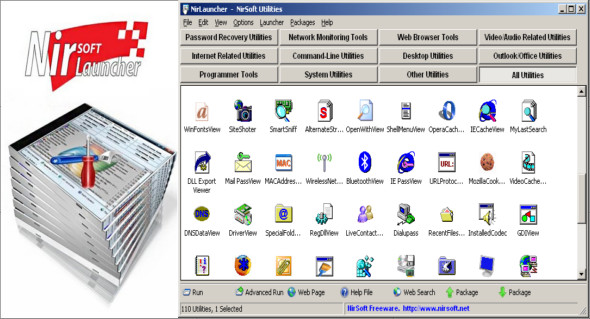
NirLauncher is a package of over 200 free utilities for Windows, with no spyware, adware, or malware. This package will not install any software on your system and will not change your web browser's homepage or any other system settings.
Features
– NirLauncher can be used from a USB drive without the need for installation.
– The NirLauncher package includes a variety of tools you might need for your computer, including utilities to recover lost passwords, monitor your network, view and extract cookies, caches, and information stored by your web browser from your system, and more…
– For each utility in the package, you can easily run it, view the help file or access the utility's web page.
– When using the USB flash drive, the configuration of each utility is saved in the .cfg file on the flash drive.
– On x64 systems, NirLauncher automatically runs the x64 version of the utility, when a separate x64 version exists.
– NirLauncher also allows you to add more software packages in addition to the main NirSoft package.
– NirLauncher allows you to generate plug-in files for BartPE (Launcher -> Generate BartPE Plugin Files), so you can easily use NirSoft utilities from a bootable Windows Live CD.
Here are some examples of what you can find in NirLauncher:
Password recovery utilities
– WebBrowserPassView – Display passwords stored by your web browser (supports Internet Explorer, Firefox, Chrome, Safari and Opera)
– Mail PassView – Recover passwords for popular email clients: Outlook Express, MS Outlook, Eudora, Mozilla Thunderbird, and more…
– MessenPass – Recover passwords for instant messaging programs: Yahoo Messenger, MSN Messenger, Trillian, and more…
– Dialupass: Dialup Password Recovery – Retrieves passwords for remote access entries (VPN and Internet connections). Also works under Windows 2000/XP.
– Network Password Recovery – freeware utility that retrieves network passwords stored by Windows XP (Credentials file).
– BulletsPassView – Reveal passwords hidden behind asterisks (“*******”) or bullet characters in standard password text boxes.
– SniffPass — Password Sniffer — Listen to your network and capture POP3, IMAP4, SMTP, FTP and HTTP passwords (basic authentication)
– PstPassword – Retrieve the password for the Outlook PST file.
Network monitoring tools
– WirelessNetView – View details of all wireless networks in your area (SSID, signal quality, MAC address, and more…)
– Wireless Network Watcher – Show who is connected to your wireless network.
– BluetoothView – Monitor Bluetooth activity around you.
– SmartSniff: TCP/IP Sniffer – Captures TCP/IP packets on your network card and displays the captured data as a sequence of conversations between clients and servers.
– CurrPorts: TCP/IP Connections Viewer – A freeware tool that displays a list of all TCP and UDP ports currently open on your local computer.
– AdapterWatch – displays useful information about your network cards: IP addresses, hardware address, WINS servers, DNS servers, MTU value, number of bytes received or sent, current transfer speed, etc.
– DownTester – Test your internet connection download speed.
Internet-related utilities
– IPNetInfo – Find all available information about an IP address: the IP address owner, the country/state name, the IP address range, contact information (address, phone, fax and email), etc.
– MyLastSearch – Display your latest searches with Google, Yahoo and MSN.
– VideoCacheView – Copying video files (.flv and others) from the web browser cache and temporary folder.
– WebVideoCap – Capture Flash (.flv) and RTSP/MMS video streams from video websites.
– Siteshotter – Take a screenshot of a website.
– DNSDataView – Display the DNS records for the specified domains.
– IECookiesView: Cookies Viewer/Manager for IE – View/Delete/Modify the cookies that Internet Explorer stores on your computer.
– IEHistoryView – View/Delete URLs you have visited in the last few days.
– HTMLAsText (HTML To Text Converter) – Freeware utility that converts HTML files into text files.
– WhoisThisDomain – Obtain information about a registered domain.
– DNSDataView – DNS lookup tool.
MS-Outlook Tools
– NK2Edit – Modify, delete, add, merge and repair records in Outlook autocomplete files (.NK2).
– OutlookAttachView – View and extract attachments in your Outlook mailbox.
– OutlookStatView – Get statistics on your Outlook mailbox.
– OutlookAddressBookView – Display/export the MS-Outlook address book.
Command-line utilities
– NirCmd: Freeware Command Line Tool — Perform some useful tasks from the command line: turn off your monitor, shut down the computer, open/close your CD-ROM drive door, dial in the VPN/Internet connection, change your display settings, and much more!
Office utilities
– SearchMyFiles – An alternative to the Windows “Search for files and folders” module, and also a duplicate file search function.
– UninstallView – An alternative to Windows uninstallation software.
– Large – Control the volume with your scroll wheel mouse!
– FileTypesMan – An alternative to the Windows “File Types” manager.
Freeware System Tools
– ProductKey – Retrieve Office/Windows CD-Key
– ShellExView – Displays details of Shell extensions installed on your computer, and allows you to easily disable and enable each Shell extension.
– WhatInStartup – Add, remove, modify or disable programs that run when Windows starts.
– USBDeview – View all USB devices installed/connected to your system.
– DevManView – An alternative to the Windows device manager.
– DriverView – Lists all device drivers currently loaded on your Windows system.
– RegScanner (Registry Scanner) – Analyze and find values in the register.
– OpenedFilesView – Show open/locked files on your system.
– SysExporter – Capture the data stored in standard list views, list boxes and drop-down list boxes from almost any application running on your system, and then export it to a text, HTML or XML file.
– BlueScreenView – Display crash information stored in MiniDump files created on the Windows blue screen.
Configuration:
– Windows (x32/x64 Bits): XP, Vista, 7, 8, 8.1, 10
– Processor: 1 GHz
– RAM: 1 GB
Language Multilingual (French included)
Size 27.5 MB
This article was updated on May 7, 2018