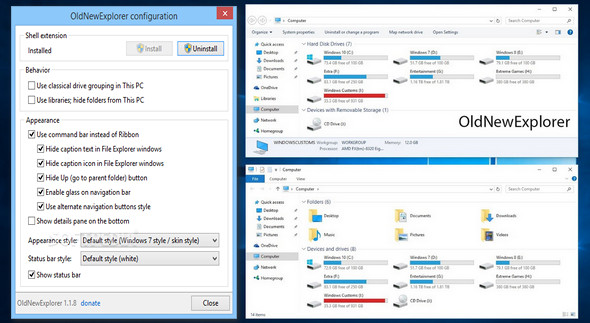
If the file explorer in Windows 8 or Windows 10 exasperates you with its "intelligent" grouping of disks and devices, its ribbon-like toolbar with large icons, or the absence of an information panel at the bottom of the window, there is a solution: it's called OldNewExplorer, and it's a shell extension that will allow you to modify certain options related to the file explorer in Windows 8 and Windows 10 to restore the functionality of the one that was in Windows 7.
You can also change the style of the file explorer and make it look like Windows 7.
Configuration:
– Windows (x32/x64 Bits): 8, 8.1, 10
– Processor: Intel 1 GHz
– RAM: 512 MB
– Disk space: 2 MB
Facility :
1. Copy the folder wherever you want
2. Launch OldNewExplorerCfg.exe
3. Select the desired items and then click on Install (use config.png to help you)
4. Restart Explorer
- Language : English
- Size : 1.74 MB
This article was updated on November 22, 2016