A blue screen usually means a lot of work for administrators. When things go wrong, there's no choice but to set up a new system configuration. And that's where O&O BlueCon comes in.
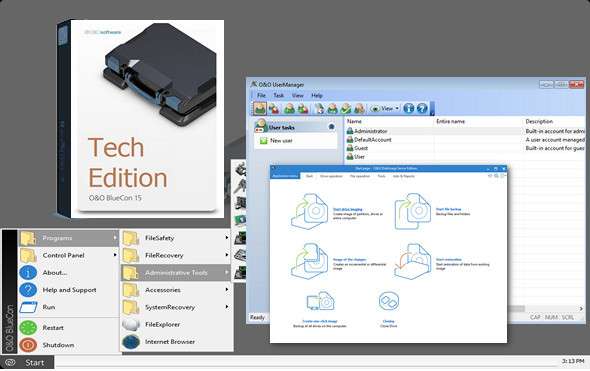
O&O BlueCon is there for an administrator during their daily routine and whenever disaster strikes. Based on Windows PE, it offers a wide range of programs for, among other things, repairing systems, finding and fixing errors, restoring lost data, resetting passwords, and much more. O&O BlueCon is an IT first aid kit for administrators on a daily basis.
O&O BlueCon starts all programs directly from bootable media (CD/DVD or USB drive), thus avoiding the risk of data loss caused by overwriting data on the computer, which can occur with a fresh installation. The seamless integration of all O&O BlueCon components saves the user the time of collecting individual programs.
O&O BlueCon 15 new features:
– Restoration of accidentally deleted data
– Data backup and restoration
– Pilot problems and service problems
– Secure deletion of data volumes
– Password reset
– Partitioning hard drives
– Remove errors from the registry
– Advanced error detection – EventViewer and CheckDisk
– Data location and deletion
– Download additional tools: integrated web browser
– NEW: Create a PXE bootable drive directly from the boot wizard
– NEW: BitLocker drives can be unlocked and accessed
– NEW: Scripting on Windows 10 networks
– Also supports Hyper-V
– Support for Windows® 7 to Windows Server 2016®
Disaster recovery that works
A system crash! A nightmare for any administrator, of course, but for others, just a challenge. While one person might be frantically trying various workarounds, another simply boots O&O BlueCon 15 directly from a bootable drive and immediately has access to a variety of tools that repair systems, find and fix errors, recover passwords, and much more. Disaster recovery couldn't be easier.
Application scenarios for O & O BlueCon
– Installing the faulty driver after a hardware change causes a blue screen.
– Windows won't start for no apparent reason
– Faulty Windows updates
– The user has forgotten their Windows password
– Files without backups are accidentally deleted
– The malicious code damaged the system
– The data must be permanently deleted from the hard drive
Everyday solutions with O & O BlueCon tools
– Resolve problems with pilots and services
– Look for errors and check the readers
– Fix Windows errors and restore systems
– Manage users and reset forgotten passwords
– Secure data deletion before disposal or computer transfer
– Recover files that have been accidentally deleted
– Search, copy and reposition data
– Reload the driver before the program even starts
– Download additional tools: integrated web browser
Boot directly from the bootable media
All O&O BlueCon programs and features can be run directly from the O&O BlueCon bootable media without any installation, even if Windows is malfunctioning or fails to boot. Thanks to an intuitive user interface, the built-in tools are extremely easy to use and require minimal learning. The O&O BlueCon bootable media has also been optimized for Windows 10 and Server 2016.
NEW: Create a PXE bootable medium from BuildPE
In a Microsoft network environment, clients can now be booted over the network—no DVD or USB drive is required. By using PXE boot media created in O&O BlueCon, clients can now boot a computer on their network from a remote machine, rather than using local media such as a hard drive, CD, DVD, or USB drive. The media created in O&O BlueCon can be stored on a central server and then activated for specific computers as needed, without the boot media being physically available. The PXE server required for this (Windows Deployment Service) is available in a Microsoft domain or can be installed there.
Integrated drivers: O & O DriverLoader
A particularly useful feature is the O&O DriverLoader, which automatically recognizes all system components and loads the necessary drivers. If a driver for a specific piece of hardware is missing, the user can quickly integrate it into the running system, granting them full access to that device.
Professional Data Recovery: O & O DiskRecovery
The new O&O DiskRecovery searches for and rebuilds files accidentally deleted or lost due to software errors. O&O DiskRecovery searches for lost data in all sectors of the hard drive, memory card, or USB drive.
Easy hard drive management: O&O PartitionManager
O&O PartitionManager allows you to create, delete, extend, and shrink partitions. It also allows you to resize a system partition and reorganize files to save space.
Accessing a computer without an administrator password
The O&O BlueCon UserManager gives you access to all registered users. You can, for example, change forgotten passwords in just a few clicks so that a user can quickly log in with a new password.
Permanently delete the data
The user-friendly O&O SafeErase wizard helps you securely erase sensitive data and entire drives, preventing data recovery. Not even with specialized software. With five different erasure methods, data can be overwritten up to 35 times.
Backing up data from corrupted Windows systems
Copy your data from faulty systems to external drives. You can access your system data without having to replace the drives – this ensures you won't lose any data. Using O&O BlueCon FileExplorer, you'll be able to access all your files and folders.
Configuration:
– Processor: 1 GHz
– RAM: 1 GB
– Disk space: 1 GB
Language : English
Size : 64-bit: 563.3 MB – 32-bit454.9 MB
The 64-bit version
The 32/86-bit version
This article was updated on January 1, 2018