With O&O Defrag, your Windows PC can run even faster. If you spend a lot of time on your PC, it can be frustrating to see the system and programs slow down, to find that backup or rendering processes take forever, or that the system freezes while you're playing a game.
Defragmenting your PC is often an effective way to get your work running smoothly again. When you defragment your hard drive, the file fragments it contains are logically reorganized. This allows the computer to quickly recognize files again and lets you use them as if they were brand new. In this way, your computer's performance could improve by up to 100%.
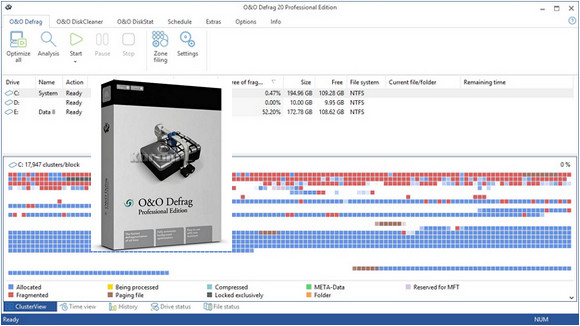
O&O Defrag displays clear graphs at a glance showing data distribution before and after defragmentation. In the new history screen, you can track defragmentation progress over several weeks and months, and optimally adapt O&O Defrag to meet your needs.
O&O DiskCleaner
It searches for and removes temporary and unnecessary files that consume memory and contribute to increasing fragmentation. O&O DiskCleaner also enhances the security of your data, ensuring that private content (e.g., Thumbs.db, document copies, email drafts, dumps) is no longer stored as unnecessary system files.
Eliminate free space to better protect your data and for greater confidentiality
With O&O Defrag 20, you can permanently overwrite unused disk space, preventing temporary and partially deleted confidential data from falling into the wrong hands. This boosts your system's productivity while simultaneously protecting sensitive data from unauthorized access—all through a single program. After each defragmentation, you can configure O&O Defrag 20 to automatically prevent the disclosure of sensitive data.
With O&O Defrag, it is possible to defragment multiple Windows drives at the same time.
Thanks to significantly faster algorithm processing, defragmentation time can be reduced by up to 40%. O&O Defrag allows you to read and write files very quickly. Your PC starts up faster and Windows runs more efficiently.
Defragment optimally: Increase your PC speed by up to 100 times with %
By continuously reorganizing the location of data on the hard drive, the Windows operating system can identify it more quickly. This can improve the processing speed of file read and write operations by up to 100 times.
Automatic background defragmentation
O&O Defrag automatically optimizes your storage media in the background, without reducing your computer's performance during this process. Available now: native optimization of virtual storage media and storage area networks (SANs).
SSD optimization independent of manufacturer
With O&O Defrag, it's possible to optimize SSDs under Windows Vista regardless of their manufacturer. Write access to SSDs is significantly faster, thus preventing premature wear.
<
Version : Pro 23.5.5029
Language : English
Size : 16.14 MB
Configuration:
– Windows (x32/x64 Bits): 7, 8, 8.1, 10
O&O Defrag 23.5.5029 Pro + Portable
This article was updated on July 18, 2020