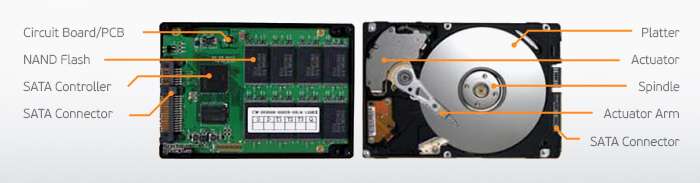
Once reserved for the wealthiest tech enthusiasts, SSDs have recently entered a phase of widespread adoption. Lower prices, higher capacities: the refrain is familiar. But for both the user and the operating system, switching from a traditional hard drive to an SSD can still require some adjustments. Follow the guide!
While the technical specifications of processors, graphics cards, and other memory modules continue to improve, the hard drive often remains the weakest link in the computer chain. It must be said that, fundamentally, magnetic platter technology dates back to the 1950s. And it is beginning to reach its limits. For far too many years, the standard rotation speed has stagnated at 7200 RPM. Models with 10,000 or 15,000 RPM remain rare and are often expensive, noisy, and generate a lot of heat. Moreover, some manufacturers are even playing the " low-tech "By reviving 5400 RPM records, whose environmental qualities they tout. Further proof, if any were needed, that the future lies elsewhere."
Slowly but surely, the Solid-State Drive SSDs (Solid State Drives) are therefore poised to replace traditional hard drives. They haven't done so entirely yet, far from it, as the price per gigabyte remains significantly higher for mechanical drives. At the end of 2011, a 120GB SSD could be had for around €150 at best… an amount that also allowed you to buy a 3TB hard drive. In other words: the cost per gigabyte was €1.25 on one hand, and 5 cents on the other. Three years later, things have improved somewhat, as 250GB SSDs can now be found for €100 (compared to €150 for 4TB drives with traditional hard drives). The price per gigabyte of an SSD has therefore fallen to 40 cents, while that of a magnetic HDD now comes in at just under 4 cents.
So there has been some improvement, but even so, switching to flash memory for our dedicated storage units is still out of the question, as the cost remains far too high. On the other hand, SSDs are performing exceptionally well as system drives. Modern operating systems (Windows 7 and 8 in particular) take full advantage of them, can manage with relatively modest capacities, and are the primary beneficiaries of the excellent performance associated with this technology.
To ensure everything goes smoothly, we will see that it is still necessary to put away some old habits, acquire one or two new reflexes, and make several very specific optimizations.
This article was updated on December 10, 2015