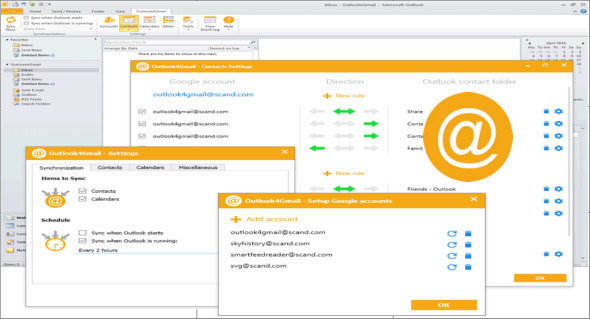
Outlook4Gmail is an add-in for Outlook that helps you sync Google accounts with Outlook, as well as sync your contacts and tasks, with customizable sync rules for any Google account or Outlook folder. It's an ideal sync tool for Outlook users with one or more Google accounts.
Main functions
– Provides automated contacts, calendars, and tasks that synchronize according to a specific time interval
– Supports synchronization of contacts, calendars, and tasks from multiple Google accounts.
– Establishes a secure connection when syncing Outlook items with Google
– Offers 3-way synchronization: Outlook ⇒ Google, Outlook ⇔ Google, Outlook ⇐ Google
– Synchronizes a large amount of data received from your Outlook and Google accounts
Contact synchronization
Outlook4Gmail synchronizes your contacts at the highest possible level: name, company, phone number, email, address, date, note, contact photo, category, Google group, etc. Outlook4Gmail also provides a duplicate removal feature, language settings, and automatic backup before synchronization.
Calendar synchronization.
The full version of Outlook4Gmail allows you to import Outlook appointments into a Google Calendar and vice versa: Google events into an Outlook calendar. It also synchronizes Google calendars from multiple Google accounts with Outlook calendars. The settings offer options for checking for duplicates, removing them, and automatically backing up data.
Task synchronization
In addition to contact and calendar synchronization, Outlook4Gmail also provides synchronization of Google Tasks with Outlook task folders. You can synchronize multiple Outlook task folders and subfolders with Google task lists. Synchronization of recurring Outlook tasks is also supported.
Configuration:
– Windows (x32/x64 Bits): XP, Vista, 7, 8, 8.1, 10
– Microsoft Outlook: 2003,2007,2010,2013,2016,2019
– Processor: 1 GHz
– RAM: 1 GB
Language : Multilingual (French included)
Size : 10.1 MB
This article was updated on November 24, 2018