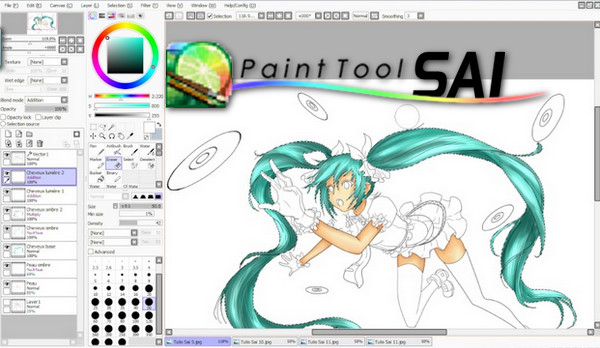
PaintTool SAI is an image editing software for creating your personal artwork. You are free to create, paint, and draw with this simple and easy-to-use program.
If you're interested in drawing or painting but aren't an advanced user, no problem. PainTool SAI is an easy-to-use program that will satisfy your painting cravings thanks to its wide range of tools.
PaintTool SAI, specializing in color changes:
PaintTool SAI lets you create anything you want. No matter what you want to change or color, this application will allow you to do it. It has scanner support to assist you in your work, and you also have a wide range of options, such as watercolors, pencils, and brushes, among others.
PaintTool SAI has a very intuitive interface that provides a simple service to users. It's simple enough even for a beginner, but perhaps too basic for an advanced user, despite having many tools.
However, you have some more complex options, such as layers, if you want to give your work a more professional touch. And if you encounter any problems while working, the program has a data protection tool. It will keep a log of errors to try and resolve them in the future.
Features :
– Customizable user interface where you can open multiple projects at once
– Sliders to zoom in on the paintings
– Airbrush, watercolor, marker and pen tools included
– Smoothing option to regulate pen pressure
– Magic Wand and Lasso Tool for selecting objects
– Elastic band tool
– Layers of linear art
– Scanner support
Configuration:
– Windows (x32/x64 Bits): XP, Vista, 7, 8, 8.1, 10
– Processor: Pentium 4 3GHz
– RAM: 512 MB
– Disk space: 10 MB
Facility :
1- Launch the file PaintToolSAI_1-2-0.exe.
* The installer will request a code.
2- Insert this code: countryboy
- Language : English
- Size : 2.1 MB
This article was updated on November 26, 2016