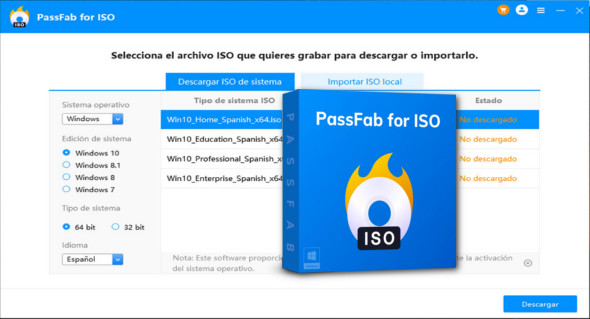
The ISO format has become an essential standard for distributing disk images, particularly in the areas of operating systems, software installations, and creating bootable media. However, managing an ISO file can be complex without the right tools. This is where PassFab for ISO comes in. Designed to simplify all ISO file operations, this software offers an intuitive interface and a range of features for effortlessly downloading, burning, extracting, and mounting Windows ISO files. You can also use EaseUS Win11Builder.
An all-in-one tool for manipulating ISO files
PassFab for ISO is a software solution that combines several essential functions, often spread across multiple separate programs. Whether you're a beginner or an experienced IT professional, this software allows you to easily manage your ISO files, with a high success rate and without requiring advanced technical skills.
Here are the key features offered:
- Direct download of Windows ISO files
Thanks to an integrated and regularly updated database, PassFab for ISO allows you to download official ISO images of Windows 11, Windows 10, Windows 8.1 and Windows 7. There is no longer any need to go through complicated Microsoft pages or use workarounds: everything is centralized in a single software. - Creating a bootable USB drive
Once the ISO image is downloaded, you can burn it to a bootable USB driveThis is essential for reinstalling Windows, repairing a failing system, or launching a recovery utility. The built-in wizard guides you step by step. - Burning ISO images to CD/DVD
For older computers or specific needs, PassFab for ISO also offers the option to burn an ISO image to an optical disc (CD or DVD). The process is fast and reliable, with post-burn verification options. - Virtual mounting of ISO files
No more need for third-party software to mount an ISO: PassFab for ISO lets you mount a disk image as a virtual drive in Windows Explorer. This allows you to browse the file's contents as if it were a physical disk. - Extracting ISO content
Do you only want to access certain files contained within the ISO image? Simply use the extraction tool to copy the contents to your hard drive. This function is ideal for retrieving drivers, executables, or documents from the image.
User-friendly interface and simplified operation
PassFab for ISO was designed to be accessible to everyone, even users unfamiliar with system tools. The streamlined interface features a clear menu with each function clearly labeled. A wizard guides the user through every action, minimizing errors and ensuring a smooth process.
The software also offers broad hardware compatibility, supporting the majority of USB drives, optical drives, and ISO images available on the market. The generated images are 100% functional and conform to official standards.
Concrete use cases
Here are some situations where PassFab for ISO proves particularly useful:
- Reinstalling Windows from a USB drive when the system is corrupted.
- Create a bootable USB drive for a client or friend, without delving into complicated command lines.
- Quickly download a clean and official version of Windows, without having to search on Microsoft websites.
- Extract a specific driver or file from an ISO image without having to mount it manually.
- Managing ISO images within an IT infrastructure, to easily deploy systems across multiple machines.
Compatibility and system requirements
PassFab for ISO is compatible with all recent versions of Windows, including Windows 11, 10, 8.1, and 7. It works on both 32-bit and 64-bit architectures and does not require significant resources. A USB flash drive with sufficient capacity (8 GB minimum recommended) is required to create bootable media.
PassFab for ISO PassFab for ISO is an indispensable tool for anyone who needs to manipulate ISO files in a Windows environment. Thanks to its comprehensive features, user-friendly interface, and reliability, it saves valuable time and prevents errors when handling disk images. Whether you're a technician, an individual user, or a system administrator, you can rely on PassFab for ISO to efficiently manage your Windows system installations, backups, and restores.
Version : 2.1.2.0
Language : Multilingual (French included)
Size : 18.20 MB
Configuration:
– Windows (x32/x64 Bits): 7, 8, 8.1, 10, 11
Download PassFab for ISO v2.1.2.0
This article was last updated on April 15, 2025