PassFab for RAR software allows you to quickly recover forgotten passwords from encrypted RAR archives (*.RAR) created by any application, including the latest version of WinRAR. Unlock all password-protected RAR archives, regardless of the compression and encryption algorithm used.
Brute force attack
Try all possible password combinations. This takes a lot of time and is usually only used when you don't know the password.
Brute-force with mask attack
Use this attack when you still remember part of your password; you can set the approximate minimum and maximum password length and more.
Dictionary Attack
Search for a password based on a built-in dictionary or one you create yourself. This is the fastest type.
Recover quickly with the graphics processor and multi-core processor
Recover your RAR password at high speed using advanced SSE technology and a new search algorithm. Furthermore, it allows you to accelerate RAR password recovery speed with multi-core CPUs, NVIDIA CUDA GPUs, and ATI OpenCL GPUs.
Here's how to use it:
1. Safely download this reliable RAR password unlocking tool to your desktop or laptop computer. Then, install it by following the wizard's instructions without hesitation.
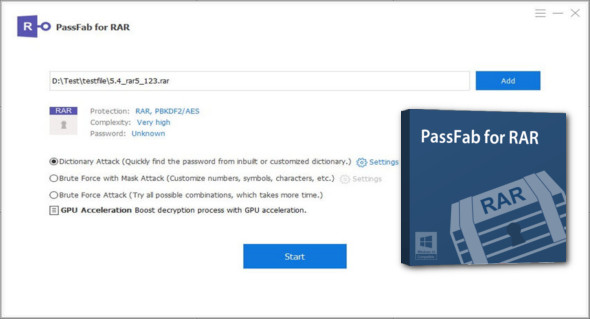
2. Run this application and prepare to import the encrypted RAR archive. It will automatically detect the file's encryption algorithm and password complexity, then display them to you instantly.
3. Choose one of the three types of password attacks: Dictionary attack, Brute force with masked attack, and Brute force attack.
4. Once you have selected the password recovery mode, you can click the Start button and wait for your RAR password to be found.
Version : 9.4.0.7
Language : Multilingual (French included)
Size : 7.05 MB
Configuration:
– Windows (x32/x64 Bits): XP, Vista, 7, 8, 8.1, 10
– Processor: 1 GHz
– RAM: 1 GB
PassFab for RAR 9.4.0.7
This article was updated on November 27, 2019