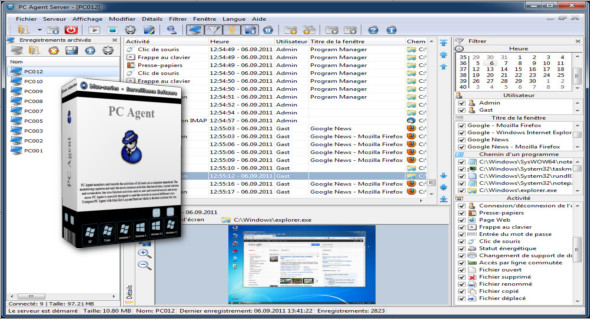
PC Agent is a handy tool that allows you to monitor all computer user activities such as keystrokes, file changes, websites visited, screenshots, emails sent and received, and much more.
The software is specifically designed to send recordings in several different ways.
– Store recordings in a directory on the computer
– Storing recordings on a network share
– Sending recordings to an email address
– Store recordings in an FTP account
– Sending records to the PC Agent Server
Record keystrokes
It records all keystrokes, shortcuts, keyboard shortcuts, and key sequences in the password input fields. The use of the Input Method Editor (IME) for entering East Asian characters is also recorded.
Record mouse clicks
Record mouse or touchpad clicks along with the control name and the text under the cursor. For example, button labels, text input fields, etc.
User login/logout recording
Logs user login and logout times along with additional information. For example, last login date, login time, number of logins, session, remote server, etc.
Save to clipboard
Saves the text and filenames that will be copied to the clipboard by the user. This is usually done using the "Copy" and "Paste" context menus or with the keyboard shortcuts CTRL + C and CTRL + V.
Save screenshots.
Captures screenshots of windows that are moved to the foreground and then within the specified interval. Motion detection, along with adjustable size and quality settings, can reduce the file size.
Save the operations to the files
Records the names of files or folders that will be opened, deleted, renamed, copied, or moved by the user.
Record the power supply status
Records power status, e.g., sleep and hibernation mode and battery status on laptops.
Recording printer
Saves print jobs to be sent to local print shops in EMF format. Saves the complete document exactly as it was sent to the printer.
Record remote access connections
Logs remote access connections with additional information. For example, device name, device type, phone number, username and password, and connection time.
Record the change in data storage
Recordings added to or deleted from the storage medium with additional information. For example, CDs, DVDs, memory cards, USB flash drives, or network drives with additional information, such as drive letter, device name, device type, serial number, and file system.
Record a webcam
Captures images from a webcam at an adjustable interval. Motion detection, along with adjustable size and quality settings, can reduce the file size of the recordings.
Record GPS location
Records GPS position within an adjustable interval from a GPS receiver supporting the NMEA 0183 standard.
Save the scanner
Records images to be read from an image input device using the TWAIN or WIA interface. For example, devices such as scanners or webcams.
Record the microphone
It records sounds through a connected microphone. Noise detection and an adjustable quality setting reduce the size of the recordings.
Save visited web pages
Saves the URL of the web page that will be visited by the user with a browser.
The following browsers are supported:
Browsers that use the Internet Explorer engine (e.g., Internet Explorer, Microsoft Edge); Browsers that use the Mozilla engine (e.g., Firefox, SeaMonkey); Browsers that use the Blink engine (e.g., Google Chrome, Opera); as well as the Maxthon and Avant browsers.
Save form data
Saves form data that will be sent using the HTTP protocol (port 80 or 443). For example, emails on the web.
Record received and sent emails
Records emails that will be sent and received using the POP3 protocol (port: 110 or 995), IMAP (port: 143 or 993), NNTP (port: 119 or 563) or SMTP (port: 25, 465 or 587).
Save FTP commands
Records FTP commands that will be sent from a program to a server using the FTP protocol (port: 21 or 990).
Record authentications
Saves passwords and usernames for authentications using the SMTP (port: 25, 465 or 587), POP3 (port: 110 or 995), IMAP (port: 143 or 993), NNTP (port: 119 or 563), HTTP (port: 80 or 443) or FTP (port: 21 or 990) protocols.
Protection against unauthorized use
The control center can be password-protected against unauthorized use. This password is required to start the control center on the monitored computer.
Configuration:
– Windows (x32/x64 Bits): XP, Vista, 7, 8, 8.1, 10
– Processor: 1 GHz
– RAM: 1 GB
Language Multilingual (French included)
Size : 7.7 MB
This article was updated on May 6, 2018