In a digital world where computer performance and reliability are paramount, having a tool capable of diagnosing, analyzing, and monitoring your system is essential. This is precisely what PC Internals offers: advanced system analysis software that allows you to examine your PC's hardware components and software processes in detail. Whether you're a power user, a technician, or simply concerned about your machine's smooth operation, PC Internals is an indispensable solution for optimizing, monitoring, and understanding your computer's inner workings.
An intuitive interface for in-depth technical exploration
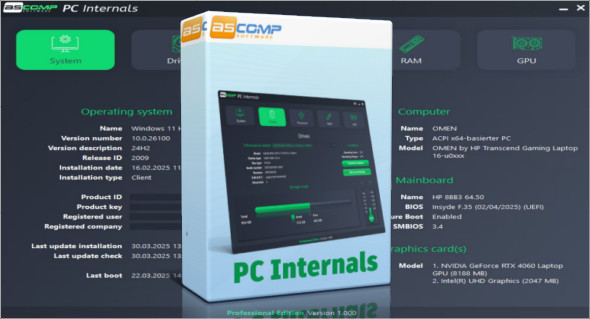
One of PC Internals' primary strengths is its clear and user-friendly interface, designed to provide seamless navigation through all the available tools. Users can easily access detailed information about their system's components, including:
- THE processor (name, frequency, number of cores, temperature)
- There RAM memory (capacity, real-time usage)
- THE hard drives and SSD (SMART status, temperature, speed, usage rate)
- There graphics card (model, temperature, performance)
- THE connected devices (USB ports, keyboard, mouse, etc.)
PC Internals also provides a real-time overview of system activity, allowing the user to quickly spot bottlenecks or abnormal processes.
A powerful diagnostic tool to identify flaws and errors
Thanks to its advanced diagnostic modules, PC Internals can detect a wide range of potential problems, such as bad sectors on hard drives, CPU overuse, full memory, or corrupted system files. The software generates detailed reports and, when possible, suggests solutions to correct the detected errors.
This feature is particularly useful for anticipating hardware failures or optimizing the overall operation of the system without waiting for a failure.
Performance optimization and proactive maintenance
PC Internals doesn't just detect problems; it also offers practical tools to improve your PC's performance. Features include:
- Cleaning up temporary files and the system cache
- Disabling startup programs to speed up booting
- Hard drive fragmentation analysis
- Monitoring the thermal state to prevent overheating
These actions help to preserve the health of the equipment and extend the lifespan of the system, while ensuring optimal ease of use.
System file analysis and logging
The software includes a section dedicated to system file analysis, allowing users to view Windows event logs, examine critical errors, and review warnings logged by the operating system. Using this data, users can trace the source of a problem, identify abnormal behavior, or simply verify that everything is functioning correctly.
A useful tool for demanding technicians and individuals.
PC Internals is designed for a broad audience. IT maintenance professionals will find it an invaluable tool for performing quick and reliable diagnostics on their clients' machines. Advanced users will appreciate the level of detail and fine-tuning capabilities. Even novice users can easily monitor their computer's health thanks to clear graphical interfaces and contextualized guidance.
Frequent updates and extensive compatibility
The software is regularly updated to incorporate the latest hardware and software advancements. It is compatible with all recent versions of Windows, including Windows 10 and Windows 11, and works on both laptops and desktop computers. You can also use Wise Care 365 Pro.
In summary, PC Internals is essential software for anyone who wants to monitor their computer's health and performance. Thanks to its detailed analysis tools, precise diagnostics, and optimization features, it helps prevent breakdowns, improve system speed, and extend hardware lifespan.
Whether you are a computer enthusiast or a user simply wanting to avoid unpleasant surprises, PC Internals is the complete solution to understand and master the inner workings of your PC.
Version : 1000 Pro
Language : Multilingual (French included)
Size : 11.05 MB
Configuration:
– Windows (x32/x64 Bits): 7, 8, 10, 11
Download PC Internals Pro v1.000
This article was last updated on April 12, 2025