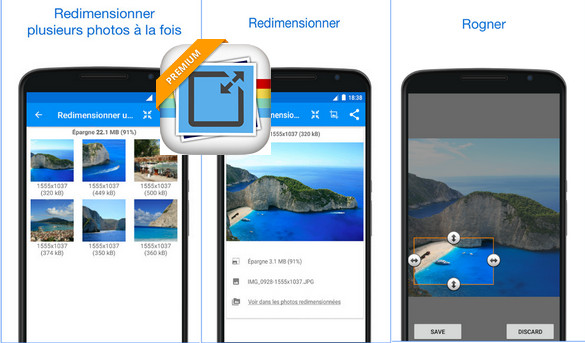
Picture Resizer helps you quickly reduce the size or resolution of your image. It can be used for text messages, emails, Instagram, Facebook, web forms, etc.
Send your photos to friends and family much faster. If you want to quickly reduce image size or resolution, Smart Image Resizer is a perfect choice. Photo Resizer lets you easily reduce photo size without losing quality. You don't need to manually save resized images, as they are automatically saved to a separate folder called " Photos / PhotoResizer » and are accessible via the gallery creation application.
Picture Resizer performs a simple task, such as resizing images, quickly and easily. This image resizer maintains the image aspect ratio by providing a list of resolutions based on the camera's resolution.
For example, if your email account allows you to send messages up to 5 megabytes (MB) and you only include two images in the attachment (photos taken with a phone or tablet camera these days are around 3 or 4 MB), you're likely exceeding the maximum message size. In this case, this image resizing app is very useful, as it helps you avoid exceeding the maximum message size limits associated with most email accounts.
How Smart Image Resizer works:
– Select the image
– Resizing displays the selected photo
– Select the resolution (width x height) from the list
– The selected image is reduced and displayed
Smart Image Resizer Features:
– Batch resizing (multiple photos resize)
– The original images are not affected
– Resized images are automatically saved in the directory 'Photos / PhotoResizer'
– Very good quality of the resized photos
– Photos resized multiple times do not lose quality
– Gesture-based photo search
– Reducing the size of the photos maintains the quality and format
– Very good compression result (the 2MB image is reduced to ~100KB – for a resolution of 800×600)
– Sent by email or SMS
– Shared via social media (Instagram, Facebook, Flickr, Google+, VKontakte, KakaoTalk, etc.)
– Most commonly used preset resolutions
– Ability to define a custom image resolution
Version Complete
Compatibility Android 4.0.3 or higher
Language Multilingual
Size : 5.6 MB
This article was updated on March 9, 2017