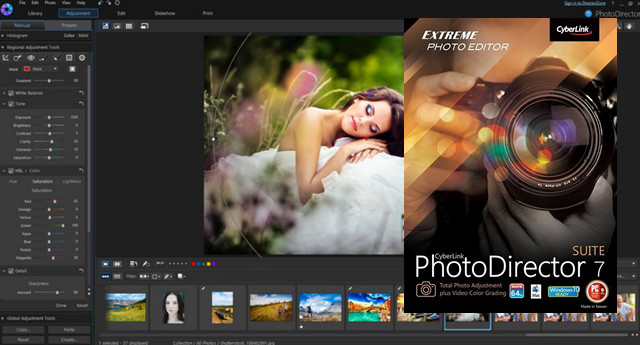
PhotoDirector 7 Suite provides a comprehensive set of tools for retouching, editing, and organizing your photos. Numerous new tools have been added, including layer editing and Blur tools. ColorDirector integration allows you to adjust the color and brightness of videos. Color settings created with PhotoDirector can be used in ColorDirector.
Diapers
Layers are a built-in tool in advanced image editing projects. PhotoDirector now lets you create and edit up to 100 layers per image, with 14 different layer blending modes. Layer management tools include rename, duplicate, delete, adjust, convert, and merge, allowing you to make the precise edits needed to create a visual masterpiece.
* Global and regional adjustment tools
– Merge up to 5 photos into a single (HDR) photo with automatic alignment and ghost artifact removal.
– Adjust individual RGB channels to correct difficult white balance problems, or to create interesting cross-processing effects.
– Draw attention to the focal point of your image by applying adjustments only to that area of your photo.
– By using gradient masking techniques, you can create miniature "tilt-shift" model effects for your photo
– Get all your photos sharp and clear, no matter what time of day you shoot. Remove artifacts from photos taken at high ISO, or in low light conditions.
– Choose from a range of photo presets, including HDR and Lomo for quick creative image adjustments.
* Blur Pro Tools
– Use the linear, circular or brush tool to create different blurred areas.
– Choose one of the 4 shapes to create a unique aesthetic feeling with Bokeh blur.
– Add a zoom or motion effect to photos with radial and focal zoom blurs.
– Use the EXIF data of your photos to instantly and accurately correct common lens defects.
– Correct distortion of the barrel, vignetting and chromatic aberrations.
– With OpenCL support
– Body & Face beautification tools
– Latest camera format and lens support
– ColorDirector 4
– Adjust the lights and shadows
– bring out the details in Low Light
– Create dynamic HDR videos
– Intelligent motion tracking
New in version 7.0.7504.0:
– Problem solving by uploading slideshows to YouTube.
– Correction of decoding issues when importing RAW photos.
– Fixed a problem that occurred when merging RAW files.
Improves compatibility with the following devices:
– Fujifilm X-Pro2 / X-E2S
Added new lens profiles for the following lenses:
– Panasonic LEICA 25mm f1.4
– LUMIX G Vario 7-14mm f4 ASPH
– Canon EF-S 18-135mm f3.5-5.6 IS STM / EF 50mm F/1.4 USM
– Sony E PZ 18-105mm F4 G OSS
– NEX E 24mm f1.8 za
– NEX E 18-200mm f3.5-6.3 OSS
– NEX E 10mm-18mm f4 OSS
– Zeiss DT 16-80mm f3.5-4.5 ZA
– Polaroid Cube
– Minor bug fixes
System Requirements
Operating system: Microsoft Windows 10, 8/8.1, 7, Vista
Screen resolution: 1024 x 768, 16-bit color or higher
CPU: Intel Pentium D 3.0 GHz CPU with hyper-threading or equivalent AMD CPU (Intel Core i7 or AMD Phenom II X4) recommended for 64-bit version
RAM: 2 GB required. 3 GB recommended for 32-bit operating systems. 6 GB recommended for 64-bit operating systems.
Hard drive space: 1 GB of disk space
Graphics cards: 128 MB of video RAM required. 1 GB or more of OpenCL-enabled video RAM recommended.
Facility:
– Once the installation is complete, merge the included reg file. (Right-click and select merge.)
– Do not open.
– Install the updates from the setup.
- Language: Multilingual
- Size: 177.97 MB
This article was updated on September 24, 2016