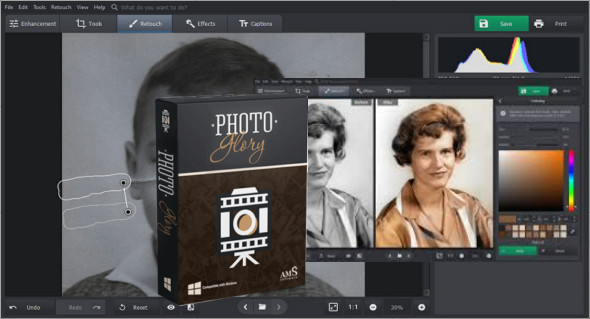
PhotoGlory, a simple yet effective program for restoring old photos, lets you revive photos from your family archives. This application also helps you clean up torn and stained old photos. You can also use Picture Colorizer Pro.
The application has a modern and user-friendly interface. You can access the recovery tools from the top menus or the right-hand panel, where you can also access many more features. You can use the image correction function to remove or correct flaws, eliminate unwanted objects such as blemishes, or adjust parts of an image. Additionally, you can manually restore black and white photos using the Correction function in the menu.
Powerful photo restoration software
– Removes scratches, creases, stains, and tears
– Colorize a black and white photo in one click
– Restore the colors of faded and washed-out images
– Add stylized text labels and date stamps
PhotoGlory Features:
– Restore the clarity, contrast, and saturation of photos
– Two colorization modes: automatic and manual
– Colorize black and white photos automatically or manually
– Integrated artistic effects
– Enhance your retro photos with 100 built-in effects
– Effortless property correction
– Straighten tilted photos and crop damaged edges
Version : Pro 5.00 / Portable: Pro 4.00
Language : Multilingual (French included)
Size : 669.07 MB / Laptop: 790.33 MB
Configuration:
– Windows (x32/x64 Bits): 7, 8, 8.1, 10, 11
AMS PhotoGlory Pro 5.00 Pre-activated
AMS PhotoGlory Pro Portable 4.00
This article was updated on March 4, 2024