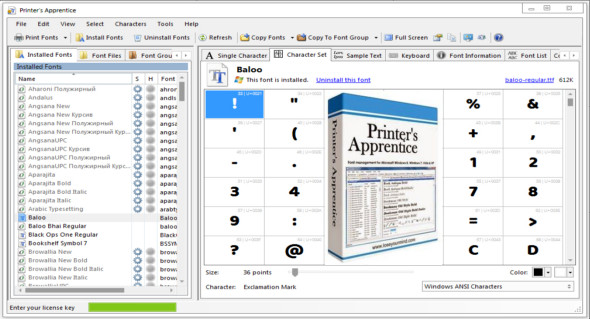
Printer's Apprentice is a fantastic font manager for Windows. Whether you're a graphic designer, publisher, or software programmer, if you have a large font collection, Printer's Apprentice will help you organize it. Font browsing, previewing, and printing are supported for TrueType, Adobe Type, and OpenType fonts.
Font browsing and preview features let you view and print fonts from any storage device without copying or installing files. You can look at each character in each font, see how fonts appear in a paragraph, find symbols on the keyboard, and more. Smart font installation and uninstallation tools give you more control over fonts than the Windows Control Panel.
Features :
– Familiar Windows Explorer-style interface for quickly viewing installed fonts or browsing uninstalled font files across all media
– The “Preview without installing fonts” function supports TrueType, Adobe Type 1 and OpenType fonts
– The toolbar provides quick and convenient access to frequently used functions
– Many dialog boxes have been redesigned to reduce the number of steps required to perform common tasks
– Unique characters, character sets, text examples and keyboard views are all integrated into the main interface via tabs located at the top of the screen.
– The character set can be displayed using a grid in a 2×2, 3×3, 4×4, 5×5, 6×6, 7×7, 8×8, 9×9 or 10×10 configuration
– The keyboard display shows you where the symbol and dingbat characters are on a standard PC keyboard
– Easily examine copyright and other information embedded in police files
– The compare fonts tab displays several fonts at once using your own example text
– Use the installation and uninstallation features to quickly manage TrueType, Adobe Type 1, and OpenType fonts on your system. No restart is required.
– Any number of fonts can be installed or uninstalled at the same time
– Uninstalled fonts can be previewed, printed and installed from all media, including external drives, CDs, flash drives, floppy disks, etc.
– The uninstallation functions remove fonts from Windows, delete registry entries related to fonts, and may optionally move font files to another location for backup.
– Organize your TrueType, Adobe Type 1, and OpenType font files as you wish by sorting them into folder groups
– The list of font groups is integrated into the printer's main Apprentice window for easier navigation
– Font groups are managed and navigated using the standard Windows Explorer style tree interface
– Easily install and remove entire font groups with just a few mouse clicks
– Fonts stored in groups can be viewed and printed just like installed fonts
– All printed catalogs and sample sheets are available for font groups
– Easily print multiple sample sheets or catalogs for several fonts at once
– Example of customizable text, headers and footers
– Font catalogs print multiple fonts per page with custom point sizes
– The font file name, path location, and knowledge base size are optionally printed for each font.
Configuration:
– Windows (x32/x64 Bits): 7, 8, 8.1, 10
– Processor: 1 GHz
– RAM: 1 GB
Language : English
Size : 10.1 MB
This article was updated on February 23, 2021