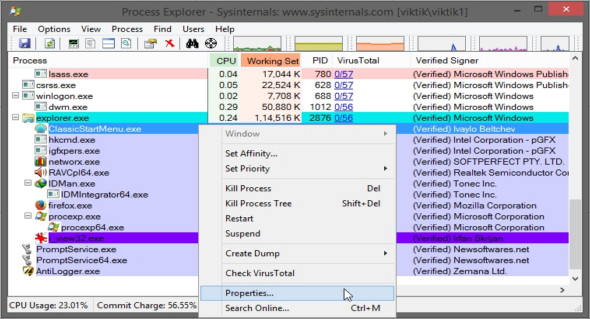
Process Explorer shows you information about open processes and processes loaded by DLLs. It's a very useful program that can replace the default Windows Task Manager, with several additional features.
Process Explorer Displays all the details of currently active processes, including their account names, while the information shown in the lower window depends on the Process Explorer state. You will see the selected operation and the DLL files loaded into memory. Process Explorer's unique features make it useful for tracking DLL problems and provide insight into the operation of Windows and applications.
Process Explorer also features a powerful search function that quickly shows you which processes have specific handles open or loaded with a DLL. The program allows you to force a session to close without risk of file loss. System performance can also be analyzed from Process Explorer, which displays system usage history and file exchange activity.
Version : 16.26
Language : English
Size : 4.20 MB
Configuration:
– Windows (x32/x64 Bits): XP, Vista, 7, 8, 8.1, 10
– Processor: 1 GHz
– RAM: 1 GB
Process Explorer 16.26 Portable
This article was updated on June 29, 2019