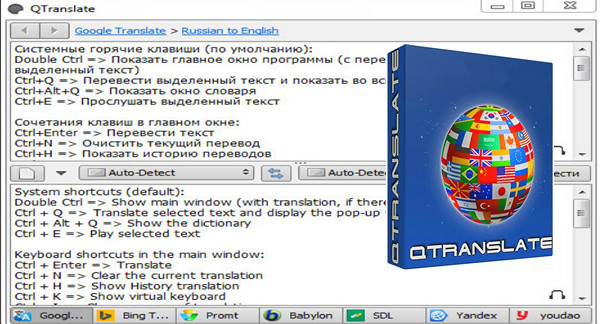
QTranslate is a free translator for Windows. With this small utility, you simply select the text you want to translate, then press the shortcut key (Ctrl + Q to display the translation in the pop-up window or double-click on Ctrl to display the translation in the main window). The program also has the ability to speak the text (Ctrl + E) and to perform a dictionary search (Ctrl + Alt + QYou can also open the main window and type the text manually.
The current version supports the following translation services:
* Google Translate
* Bing Translator
* Promt
* Babylon
* SDL FreeTranslation.com
* Yandex.Translate
*Youdao
The program has two mouse-selection translation modes (Click the program icon in the taskbar to activate this mode):
Display the icon (select the text in any program, the program icon will appear near the cursor. Click on the icon, the pop-up window with the translation of the selected text will appear).
Display the translation (select the text in any program and the pop-up window with the translation of the selected text will appear immediately).
Key features:
– Translate text in any application that supports text selection (Google Chrome, Microsoft Word, Microsoft Outlook, Acrobat Reader, Skype, IE and etc.).
– Search in online dictionaries.
– Backwards translation.
– Replace the selected text with its translation.
– Instant translation.
– Spelling check.
– Text-speech synthesis.
– Word suggestion / auto-completion.
– History of translations.
– Virtual keyboard.
– An OCR (Optical Character Recognition) function
What's new in version 6.3.0?
New: Naver translation service
New: OCR API option for text recognition
New: Voice input auto-detection language option
New: Keyboard shortcut
Fixed: Google Translate, Yandex, Prompt services display a 'No data' error when the text exceeds the limit.
Answer key: Oxford Learner Dictionary service
Fixed: "Unable to play audio stream" error when Windows changes the default sound device
Configuration:
– Windows (x32/x64 Bits): XP, Vista, 7, 8, 8.1, 10
– Processor: Pentium 4 3GHz
– RAM: 512 MB
– Disk space: 10 MB
– Internet connection
Facility :
– Simply launch the installation file QTranslate.6.3.0.exe
Portable version
– Simply launch the portable version file/QTranslate.exe
– Language Multilingual (French included)
– Size : 1.5 MB
This article was updated on February 20, 2017