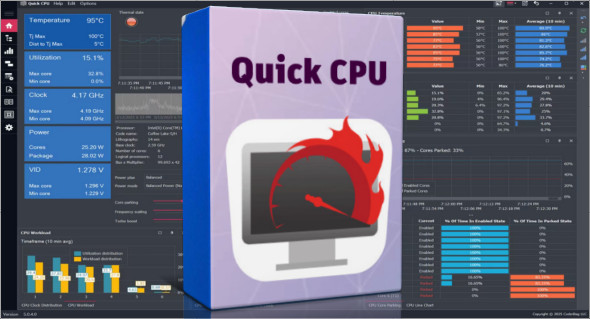
Quick CPU Pro is a powerful and advanced software designed to allow users to monitor, control, and optimize their processor (CPU) performance in real time. Intended for Windows users, on both Intel® and AMD® configurations, this program allows for complete customization of power settings and computer performance. Thanks to its intuitive interface and advanced technical features, Quick CPU Pro is an essential tool for gamers, content creators, IT professionals, and PC tuning enthusiasts.
In a world where computing performance has become paramount, Quick CPU Pro This software allows you to fully exploit the potential of your processor. Whether you want to increase the responsiveness of your system, save energy, or optimize the performance of your applications, this software offers a complete range of options to adapt your CPU to your needs.
Quick CPU Pro Main Features
- Core Parking Control
Enable or disable CPU core parking to optimize power consumption or unleash the full power of your processor. This feature is essential for users looking to boost performance in games or demanding tasks. - Frequency scaling management
Dynamically adapt the CPU frequency according to current usage, improving energy efficiency while maintaining performance. - Activation of Turbo Boost and Precision Boost
Configure and adjust the automatic overclocking features of Intel and AMD processors to benefit from increased performance in real time. - Advanced CPU settings (Intel only)
Access highly advanced CPU settings such as FIVR, Speed Shift, and Turbo Power Limits. These settings are intended for experienced users who want to control every detail of their processor. - Support for P-Cores and E-Cores
For users equipped with Intel hybrid processors, Quick CPU Pro allows separate management of high-performance cores (P-Cores) and efficient cores (E-Cores). - Creating and managing Windows power plans
Create custom energy plans, save them, export them, or restore the default settings at any time. - Customizable interface
Quick CPU Pro offers a customizable dashboard with dark mode, real-time performance visualization, and adjustable color bar indicators. - Real-time monitoring from the taskbar
Monitor your CPU, memory, GPU performance and system temperature at a glance, directly from the Windows notification area. - Compatible with the latest versions of Windows
The software is fully compatible with Windows 10 and Windows 11 (64-bit), and only requires a .NET Framework 4.7.2 or higher.
Quick CPU Pro vs free version
The free version offers an excellent starting point, but the Pro version goes much further:
- Access to advanced settings reserved for professional users
- More advanced visual customization (colors, graphics)
- Priority customer support
- Continuous updates to advanced features
Precautions for use
Although Quick CPU Pro is extremely powerful, it's recommended that you back up your current settings before making any significant changes. Incorrect configuration can lead to system instability or CPU overheating. If you're a beginner, start with minor adjustments.
Recommended alternative: CPUID HWMonitor
If your primary goal is to monitor the CPU temperature, voltage and other hardware components without attempting to modify performance parameters, you can also try CPUID HWMonitor Pro PortableThis complementary software is ideal for those who want a precise and portable visualization of system data, without complex installation.
Why choose Quick CPU Pro?
- Advanced optimization for the video games and heavy software
- Complete control over power and performance
- Intuitive and customizable interface
- Compatible with the latest CPU technologies
Whether you're looking to speed up your Windows 11 PC, reduce your laptop's power consumption, or improve your FPS in video games, Quick CPU Pro is the tool you need.
Version : Pro 5.1.0
Language : English
Size : 75.29 MB
Configuration:
– Windows (x64 Bits): 10, 11
Download Quick CPU Pro v5.1.0 + Portable
This article was updated on July 1, 2025