
It is possible to retrieve all the passwords saved on your computer in just a few minutes. There are even two methods allowing you to retrieve them, and you can also export them all in the blink of an eye.
1- For multiple browsers
If you use multiple browsers, the utility WebBrowserPassView will allow you to retrieve at the same time the passwords saved on these different browsers: Internet Explorer, Mozilla Firefox, Google Chrome, Safari, and Opera.
2- Simple method without installing software
Since there are several web browsers, we can't study them one by one. So, we'll look at a trick that will allow us to retrieve any password saved on any browser.
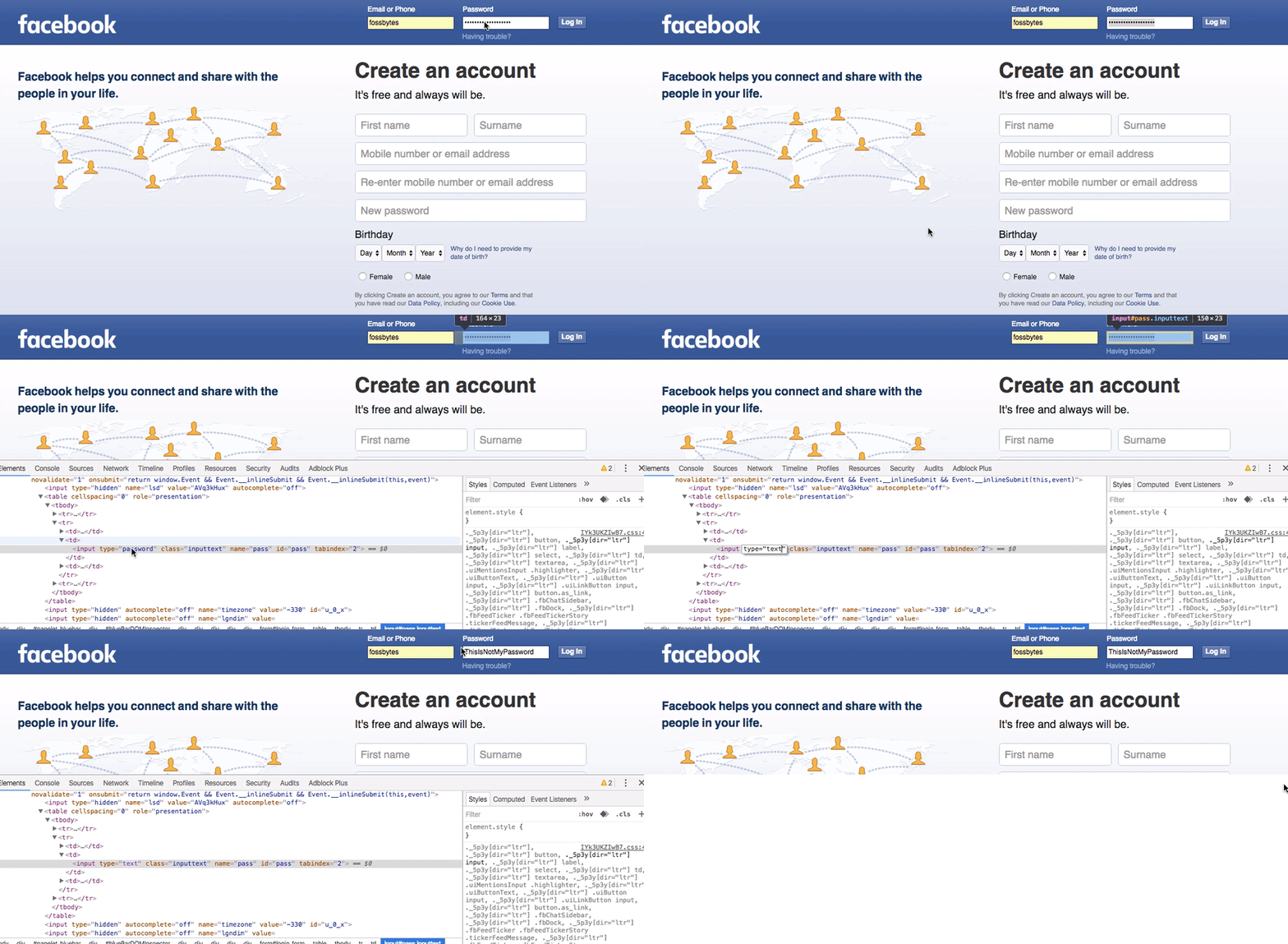
Click on the image to watch the tutorial (animation)
1- On your Chrome browser, go to the page of the website from which you want to recover the password.
2- Once the username is entered, the password appears as dots.
3- Next, to display the password, right-click on the password field and click on inspect the element.
4- On the source code frame, look where it is written type="password" "
5- Replace password by text.
6- Finally, look at the password field, you will see that the password is displayed in plain text.
This article was updated on September 3, 2016