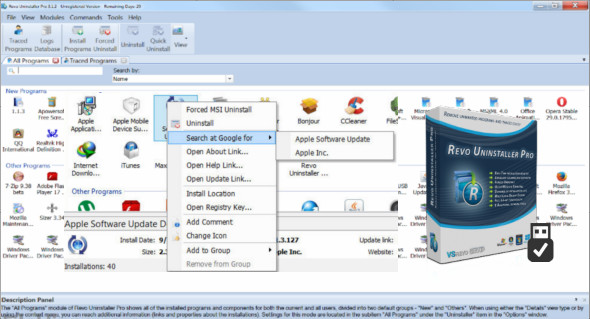
Revo Uninstaller Pro is an uninstallation program that helps you easily remove unwanted programs from your computer. It deletes all program data and leaves no trace, such as registry entries or program files. With Revo Uninstaller, you can be sure you're cleaning your system of all these remnants and bringing more comfort and optimization to your computer.
Revo Uninstaller is an excellent alternative to "Add/Remove Programs" in Windows and offers numerous features to quickly and thoroughly remove all program content from your computer. Unnecessary files, folders, registry keys, and values can be efficiently removed.
Revo Uninstaller also includes a number of cleaning tools, such as junk file cleaner, browser cleaner, MS Office cleaner, Windows cleaner and Autorun manager, which allow you to take control of programs that start automatically with Windows.
Features of the Uninstaller Pro software:
– Complete uninstallation of the software
– Quick uninstallation of one or more programs in succession
– The best Windows application for easily uninstalling programs
– Delete unnecessary files and program files
– Compatible with all 32-bit and 64-bit versions of Windows
– Portable version for all your Windows devices
– Easy-to-use, customizable and flexible user interface.
What's new ?
* Added — Ability to transfer all tracked logs between the installation version and the portable version.
* Added — Ability to save and restore all tracked logs
* Added — Browser extensions now detect Opera extensions.
* Added — Export list functionality in the context menu of browser extensions and Windows Apps modules
* Minor bug fixes
* Updated language files
Configuration :
– Windows (x32/x64 Bits): XP, Vista, 7, 8, 8.1, 10
– Processor: 1 GHz
– RAM: 1 GB
Language : Multilingual (French included)
Size : 39.9 MB
This article was updated on December 12, 2018