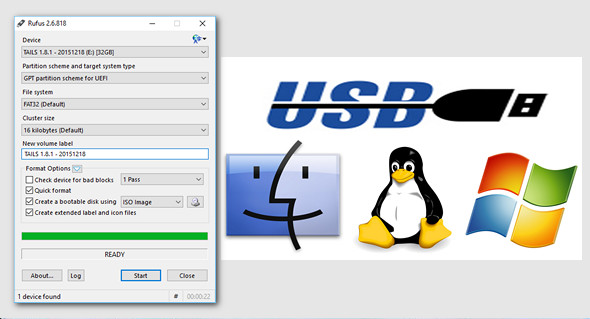
Rufus Portable is a USB formatting utility that can also create a bootable USB drive using a bootable ISO image. This application requires administrator privileges.
Rufus is a small utility that helps to format and create bootable USB drives, such as USB flash drives/pendants, memory sticks, etc.
This can be particularly useful in cases where:
* You need to create USB installation media from ISO files (Windows, Linux, etc.)
* You must work on a system that does not have an operating system installed
* You need to flash a BIOS or other DOS firmware
* you want to run a low-level utility
Features:
– USB, flash card and virtual drives on FAT / FAT32 / NTFS / UDF / exFAT / ReFS
– Create bootable DOS USB drives using FreeDOS or MS-DOS
– Create bootable BIOS or UEFI drives, including bootable UEFI NTFS
– Create bootable drives from the bootable ISO (Windows, Linux, etc.)
– Create bootable drives from bootable disk images, including compressed drives
– Create Windows To Go drives
– Twice as fast as Microsoft's USB/DVD tool or UNetbootin, on ISO -> USB creation (1)
– Performing faulty block checks, including the detection of "fake" flash drives
– Calculate the MD5, SHA-1 and SHA-256 control supports of the selected image
– Modern and familiar UI, with more than 35 natively supported languages
– No installation required.
– Portable
– Free 100% software (GPL v3)
Version 2.17 (2017.09.12)
– Add support for Debian 9 live ISO in UEFI mode
– Add support for Super Floppy Disk “partitioning” mode
– Add support for more USB card readers
– Strengthen download update checks
– Fixed an issue where Spanish translation prompts were not displaying correctly
– Fixed an issue with Windows To Go support on some unofficial ISOs
– Fixed an issue with automatic log checking
– Fixed an issue when using A: or B: as drive letters
Configuration:
– Windows (x32/x64 Bits): XP, Vista, 7, 8, 8.1, 10
– Processor: 1 GHz
– RAM: 512 MB
– Disk space: 2 MB
Portable version:
Launch the file rufus-2.17p.exe
Language Multilingual (French included)
Size : 1.8 MB
This article was updated on September 12, 2017