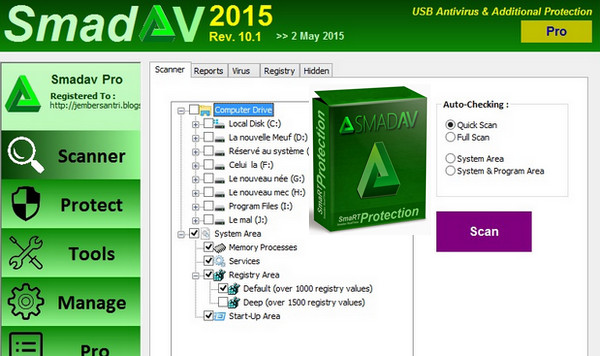
Smadav 2015 Rev. 10.1 : The addition of 315 virus databases and 3992 new virus variants, more security features while browsing the Internet, Facebook virus Clean-Share, Autoit, etc.
1) Additional protection for your computer, 100% compatible with other antivirus programs!
Most antivirus programs cannot be installed alongside other antivirus software because they are designed for primary protection on your computer. Unlike Smadav, Smadav antivirus is designed as a supplementary layer of protection, making it compatible with 100% and able to function even if another antivirus program is already installed. In this case, Smadav acts as a second layer of defense. Smadav employs its own unique methods (behavior, heuristics, and whitelisting) for detecting and cleaning viruses, further enhancing computer security. Because Smadav uses very few resources, it won't significantly impact your computer's performance. Therefore, combining Smadav with your existing antivirus software will strengthen your computer's defenses against viruses.
2) Best USB Antivirus (Total USB Protection Stick)
USB drives are one of the most common vectors for viruses in Indonesia. Smadav has special technology for preventing viruses that spread via USB drives. Smadav's mission is to detect the most contagious flash drive viruses. Smadav has many virus signatures that infect flash drives and a special ability to detect new flash drive viruses not yet in its database. In addition to prevention, Smadav can also clean infected viruses and restore hidden files on the USB drive.
3) Ideal for offline use (no need to update too often)
Smadav is very well suited for computers that are rarely or never connected to the internet. Smadav doesn't need to be updated as frequently as other antivirus programs, which typically release updates weekly or even daily. Smadav usually updates once a month. Smadav isn't overly reliant on its virus signature database, but rather on its behavioral detection techniques, heuristics, and whitelisting.
4) Cleaner and tools for removing the virus
Smadav is also capable of cleaning the virus that infected your computer and repairing the registry modified by the virus. Other antivirus programs generally do not perform registry cleaning, so the computer may not return to normal after the antivirus scan. Many support tools are included in Smadav as a weapon for virus cleaning. Note: While all types of viruses can be cleaned by Smadav, it is not yet able to remove rootkit viruses or rootkit programs (e.g., Ramnit, Sality, Alman, Virut, etc.) because these strains have damaged most of your program files. Our current focus is on thoroughly cleaning virus types other than these two (e.g., WormShortcut, MSO, Brontok, etc.).
What are the advantages compared to Smadav Pro Free?
Smadav Pro has many additional features not found in the free version. The following are some of the extra features you might want in Smadav Pro: automatic online updates, faster scanning, an exception list, zoom/resize functionality, theme color changes, an administrator password, profit and usage rights. You must be a member to get Smadav Pro. Note: Smadav Free and Pro have the same detection capabilities. The difference lies in the automatic update function and other additional features.
Configuration:
– Windows (32/64bits): XP, 7, 8, 8.1, 10
– 500 MHz processor
– 256 MB of RAM
– 5 MB of free space
Facility :
1- Install the antivirus (smadav101.exe).
2. Open the antivirus software
3- Go to the "Manage" menu
4- Insert the key (There are several, select only one)
- Language: English
- Size: 1.2 MB
This article was updated on October 1, 2016