SmadAV is an antivirus that protects your computer against all kinds of threats: viruses, spyware, and malware. It has special technology for the complete prevention of viruses that spread via USB drives. You can also download Loaris Trojan Remover.
SmadAV is an additional antivirus software; you also always have the option of installing other antivirus programs that can be used in conjunction with SmadAV to protect your computer. It is fully compatible with other antivirus software.
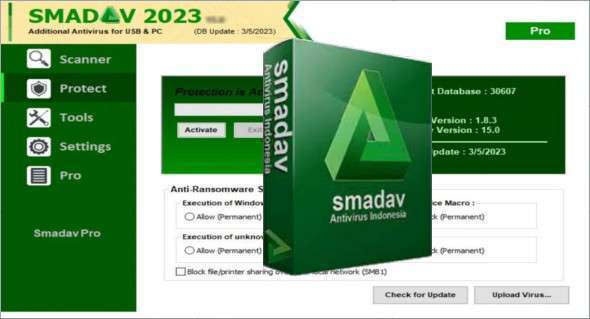
It offers a user-friendly interface with a sidebar that provides access to key features: scanning your computer and managing the various protection modules. SMADAV Antivirus is very lightweight, running on minimal CPU and memory.
Smadav Pro
Smadav Pro has many additional features that do not exist in the free version; the following are some of the additional features you would get with Smadav Pro: Automatic online update, quick scan, exception list, enlarge/resize, scene color change, administrator password, license and profit usage.
Automatic online update
Smadav Pro can perform automatic updates. Smadav will install the new update without user intervention.
List of exceptions (list of exclusions)
Smadav Pro's Exception List has a feature that can be used to bypass (ignore) scanning of a specific file, folder, or registry entry that you consider safe and should be ignored. Once a file, folder, or registry entry is added to the exception list, it will be ignored and will no longer be detected by Smadav as a virus.
Administrator password
If you are an administrator on a computer network (such as cafes, businesses, etc.), restrict the use of Smadav by adding a password to access all of its features. Users will still be able to perform virus scans and cleanups, but will not be able to access the quarantine function, updates, tools, or settings in Smadav unless they have the administrator password.
Color Change Themes
Smadav Pro has the ability to change the theme color; the original green color can be changed to your preferred color. In the theme color settings, you can find your own color choices for the Smadav theme. After changing the theme color, the color of all Smadav displays will automatically change to your chosen color.
Version : Pro 15.1
Language : English / Indonesian
Size : 1.94 MB
Configuration:
– Windows (x32/x64 Bits): 7, 8, 8.1, 10, 11
Smadav Pro 2023 v15.1
This article was updated on December 12, 2023