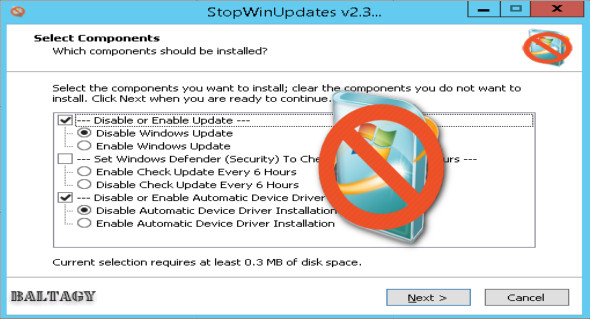
StopWinUpdates is an excellent application for disabling or enabling automatic Windows and Store updates imposed by Microsoft. StopWinUpdates is a portable application, but it behaves and looks like an installer, which we found confusing. Double-click the executable and choose your options. By default, if you want to disable Windows Update, this option is checked. You will again see prompts indicating that the program is installing, but it is simply applying your changes.
StopWinUpdates will close when you're finished and want to restart for the changes to take effect. If you change your mind, run the application again, make the necessary changes, and then restart.
Notes:
1— By default, Windows Update service is set to manual
2— Store, Edge, and Defender are working
3— The Windows Update page in Settings will display a blank page in Windows 10 1607 or earlier; this is normal.
4— Disabling updates will automatically hide the Windows Update page in settings so that it opens Windows Defender (security) instead in Windows 10 version 1703 or later
5— If you used a tool to disable updates, you must use the same tool to enable them, to reset the permissions!
6— You must restart after enabling or disabling updates
7— Option to disable or enable automatic update apps from the store (Win10)
8— Option to update Windows Defender (security) every 6 hours (Win8.1 / Win10)
9— Option to disable or enable automatic device driver installation
10— Disable or enable automatic downloading of language-related components (Win10)
11— Option to disable or enable automatic offline map downloads
Configuration:
– Windows (x32/x64 Bits): Vista, 7, 8, 8.1, 10
– Processor: 1 GHz
– RAM: 1 GB
Language : English
Size : 0.8 MB
This article was updated on August 26, 2018