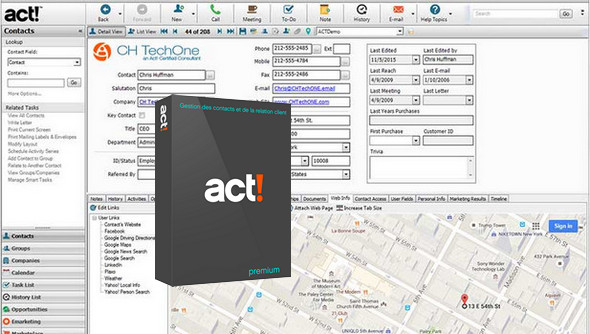
Effective customer management, sales automation and email marketing.
Economical and ergonomic, Act! Premium is specially designed to help individuals, businesses and SMEs be better organized and more productive, and to excel in sales and marketing activities.
The Act! suite of solutions adapts to your work style; its flexibility allows it to meet all your payment, deployment, and access needs. With the on-premises option or cloud hosting, you can work online to access and update data in real time, or work offline and then synchronize changes the next time you connect.
Team collaboration to stay informed about the latest contact and activity information, automation of business processes, and sending targeted email campaigns, from the office or on the go.
Customer information capital
– Ultimate preparation
– Personalized interactions
– Effective planning
Top productivity
– Effective sales tracking
– Automated processes
– Maximum efficiency
– Always connected
Informed decision-making
– Progress assessment
– Access to new markets
– Strengthening the monitoring of activities
Database server:
Act! Premium uses SQL Server 2008 R2 SP1 Express or your existing SQL Server 2008 R2 installation. Act! has also been tested to work with an existing SQL Server 2012 and 2014 installation. If you wish to use a different version of SQL Server, please consult the Microsoft documentation for that version's specific requirements.
SQL Server Recommendations:
SQL Express limits the number of CPU cores/sockets, the memory used by SQL, and the size of your data file to 10 GB. For this reason, we recommend SQL Standard for any deployment exceeding 20 users or 2 GB in size. Performance may vary depending on the users, the size of their databases, hardware specifications, and product usage.
Configuration:
– Windows (x32/x64 Bits): XP, Vista, 7, 8, 8.1, 10
– Processor: 1.8 GHz
– RAM: 1 GB
– Disk space: 1 GB
– Compatible with: Microsoft® Office 2007, 2010, 2013, and 2016
Facility :
0-Disconnect your internet.
1- Install ACt Premium
2- Launch the software with privileges administrator
3- Click on " Save " Then " Following"
4- Launch the keygen to obtain a serial number (Do not close the keygen)
5- Copy/paste this code and click on following
6- Select " Register by emailL "
7- Fill in the fields (fictitious information!)
8- Then click on " I need to create the message manually"
9- Copy the installation code and paste it into the keygenclick on " Activation to generate an activation code
10- In the next window, paste the code and click on " Enable"
- Language : French
- Size : 580.9 MB
This article was updated on November 28, 2016