SysTools Hard Drive Data Recovery is an excellent application that allows you to recover corrupted, deleted, and formatted files from your hard drive. The program supports drives formatted with FAT32, FAT16, ExFAT, and NTFS.
This tool professionally supports RAW hard drive data recovery, making it easy to recover raw data files such as ZIP, JPEG, GIF, PDF, MPEG-III, PNG, DOCX, PPTX, XLSX, WAV, AVI, BMP, and more from formatted drives. Simply follow a few steps to recover lost files from both internal and external hard drives. It also allows you to preview items and filter search results by modification date, creation date, file type, and other criteria.
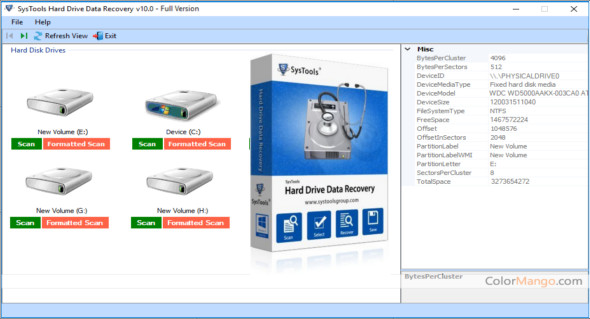
The SysTools Hard Drive Data Recovery tool will scan the entire hard drive and list all corrupted files and folders in the software panel. It also provides information about each detected file, such as the file name, size, extension, creation date, and last modified date. You can also use Windows Data Recovery Pro.
SysTools Hard Drive Data Recovery Feature
– Recover and save files and folders permanently deleted from the hard drive
– Supports data recovery from formatted and corrupted FFS, exFAT, and NTFS file systems
– Recover data from any internal/external hard drive of the computer
– Recover photos, videos, music, documents and other multimedia files
– Refresh option to detect a connected external storage device
– Supports RAW data recovery from internal and external hard drives
– Assistance to recover lost data from a desktop computer, computer, or laptop
– Recover lost data from GPT and MBR hard drive partitions
– Recover deleted files after formatting the hard drive to NTFS or FAT format
– Fast data recovery from IDE, EIDE and SATA devices
– The hard drive recovery software is compatible with all versions of Windows
Version : 16.3
Language : Multilingual (French included)
Size : 9.20 MB
Configuration:
– Windows (x64 Bits): Vista, 7, 8, 8.1, 10
SysTools Hard Drive Data Recovery 16.3
This article was updated on March 27, 2021