Systweak PDF Editor is a powerful and intuitive software that offers a complete solution for managing, editing, and creating PDF files. Designed for individuals, professionals, and students, this program provides a range of advanced features for editing your PDF documents accurately and efficiently, while maintaining a user-friendly and easy-to-learn interface.
Intuitive interface and optimized user experience
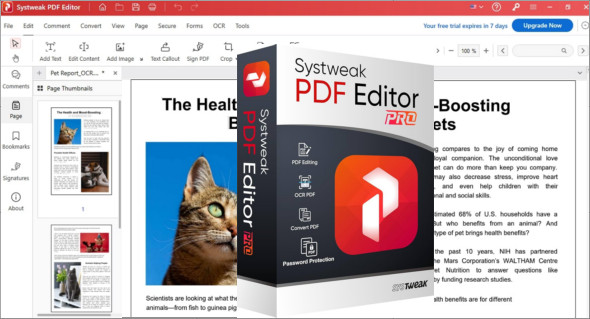
Systweak PDF Editor stands out for its clean and accessible user interface. The menus are clear, the icons self-explanatory, and the tools well-organized for smooth navigation. Even less experienced users can easily understand how to use the editor's main features. Whether you need to edit text, insert an image, or sign a document, everything is readily available.
Advanced editing functions
This software lets you edit the content of an existing PDF as if it were a Word document. You can add, delete, or move text, change the font or size, and even edit embedded images. Thanks to its intelligent recognition technology, the edits blend seamlessly into the style of the original document, avoiding the layout inconsistencies often seen with other tools.
Simple and fast file conversion
Systweak PDF Editor includes a powerful conversion module that allows you to convert PDF files to other formats Popular formats such as Word, Excel, PowerPoint, HTML, and images (JPG, PNG) are available. The reverse is also possible: you can convert Word, Excel, or other files into PDF documents without any loss of quality.
This feature is particularly useful for users who work with different types of files on a daily basis and wish to centralize their work in a universal and secure format.
Security and protection of documents
Confidentiality is essential when working with sensitive files. Systweak PDF Editor offers several options for Protect your PDFs with a passwordencrypt your data or restrict certain actions such as printing, modifying or copying content.
In addition, it is possible to add an electronic signature to your documents, which facilitates professional exchanges and speeds up the processing of contracts, quotes or other legal documents.
Annotation, highlighting and collaboration
Systweak PDF Editor offers a range of annotation tools to facilitate review and collaboration. You can highlight text, insert comments, add notes, stamps, or even geometric shapes to draw attention to specific sections of the document. These features are particularly useful in professional or academic settings where multiple people are working on the same file.
Useful additional tools
In addition to basic functions, Systweak PDF Editor includes several practical tools such as:
- Merge multiple PDF files into a single document.
- Split a PDF document into multiple files according to the pages.
- Extract specific pages.
- Reorganize the pages (by drag and drop).
- Insert headers, footers and watermarks.
These tools make this software a true toolbox for managing PDF files.
Installation and compatibility
Systweak PDF Editor is a Windows-compatible software that installs in just a few minutes. It requires no advanced technical skills and runs smoothly even on computers with modest specifications. You can also download Foxit PDF Editor Pro.
Why choose Systweak PDF Editor?
- Intuitive interface and modern design
- Editing text and images without altering the format
- Digital security and signature tools
- Fast conversion to multiple formats
- Ideal for professionals, students and SMEs
- Regular updates and responsive customer support
In summary, Systweak PDF Editor is one of the best tools on the market for managing your PDF documents professionally. It combines power, simplicity, and security, all within a modern interface suitable for all user profiles. Whether you need to edit a contract, convert a resume, or protect a confidential report, this software is the ideal solution.
Version : Pro v1.0.0.7387
Language : Multilingual (French included)
Size : 305.41 MB
Configuration:
– Windows (x32/x64 Bits): 7, 8, 8.1, 10, 11
Download Systweak PDF Editor Pro v1.0.0.7387
This article was updated on May 3, 2025