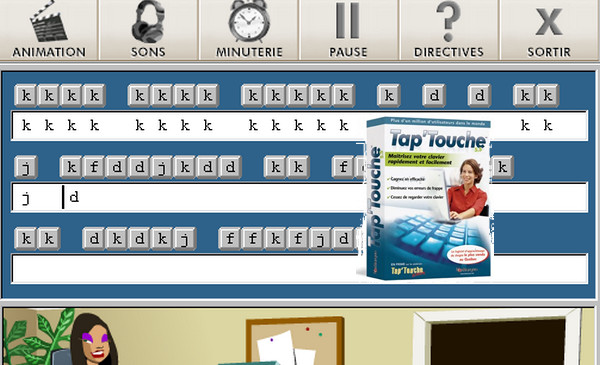
Tap'Touche is software that allows users to learn to type on a computer keyboard at a professional speed. This clever software is fun and colorful. It has an easy-to-use, very intuitive interface.
The two Tap'Touche methods
Tap'Touche offers users two learning methods: the Gregg method and the LaSalle method. When creating an account, users can choose between the two methods to find the one that best suits them. Furthermore, users can add features they need, such as adjustable difficulty levels or specializations like bilingual modes, numeric keypads, and more. If users are unsure which options to choose, they can take a test to help guide them.
An enjoyable learning experience
Learning is primarily based on exercises. The exercises are fun, and the difficulty increases as you progress. To help you understand the exercises, animations add atmosphere and provide clear explanations. To complement the exercises, Tap'Touche offers lessons and dictation exercises. Learning progress tracking is available to support the budding typist, allowing them to monitor their progress and set goals.
Spyware
Tap'Touche is always there, even when the user is doing something else. A tracking system monitors the keyboard movements of the Tap'Touche learner, tracking their strengths and weaknesses when using other software, such as email, word processing, etc. By monitoring the user's daily computer activity, Tap'Touche can then offer exercises perfectly tailored to their skill level.
New features in version 5.x:
– Learning keyboard shortcuts
– Option to add your own text
– Option to print the texts for practice in real-life situations
Features :
– Automatic adaptation to all types of keyboards (Azerty, Qwerty, Qwertz, …) (exclusive)
– Placement test to assess your level
– Typing learning methods designed by typing specialists
– Numerous voice dictations
– Practice texts in French, English and Spanish (exclusive)
– Exercises specific to Internet characters (exclusive)
– Exercises for the numeric keypad
– Tailor-made advanced training exercises
– Option to add your own text
– Detailed statistics to track your progress
– The Spy that analyzes your performance in other software
– Learning keyboard shortcuts (exclusive)
– Advice on ergonomics and good working habits
– Stimulating games to learn to type while having fun
– Character display
– Possibility of printing the texts to practice in real-life situations.
Configuration:
– Windows (32-bit / 64-bit): XP, Vista, 7, 8, 8.1
– CPU: 600 MHz (Pentium)
– RAM: 128 MB
– HDD: 320 MB
Facility :
1 – Edit with your software (Daemon tool Or Magic Iso…)
2 – Use the serial number that is in the ISO.
* For those who have Windows Vista, Seven, 8 and 8.1
1. Install the software (the serial number is 9kcg-vncj-9ra3-rsa4) but at the end of the installation, uncheck the box that says "Start Tap Key"
2. After that, right-click on the "Tap Key Shortcut" located on the desktop and then "Open file location".
3. Right-click on the same "TTouche" file that is selected in the open window and click on "Properties".
4. Go to the "Compatibility" tab and click on "Change settings for all users".
5. Check the box "Run this program in compatibility mode for" and choose "Windows XP (Service Pack 3)" from the drop-down menu.
Then click OK twice to finish.
- Language: French
- Size: 162.7 MB
This article was updated on October 8, 2016