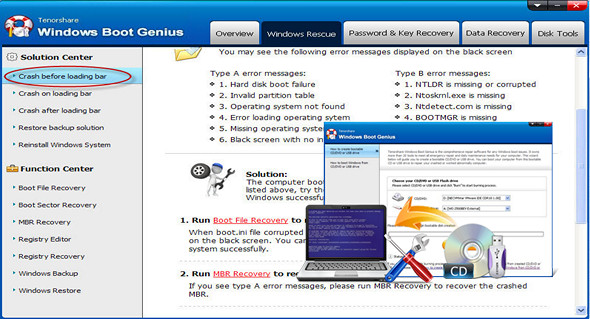
Windows Boot Genius is a software that aims to solve a variety of boot problems, including computer crashes, blue screen, random restart, failure to boot, and other Windows startup issues.
Windows Boot Genius can burn a bootable ISO image to a blank CD/DVD/USB to help you start your PC and resolve all boot problems on Windows 10/8.1/8/7/XP.
Password
Windows Boot Genius allows you to recover lost passwords for local administrator / user / domain administrator / Windows product key / Office product key as well as SQL Server Key.
Flexible Data Welder
Have you lost valuable data due to a system crash, hard drive failure, or a malfunctioning computer? No idea how to recover it? Data recovery software like Windows Boot Genius can help you recover lost files, backup partitions, or entire hard drives, either completely or individually.
All-in-one disk tools
Instant data backup is the safest way to prevent data loss due to Windows crashes and accidental deletion. Windows Boot Genius lets you back up your hard drive, Windows system, applications, and files. You can also easily restore Windows backup files without reinstalling the Windows operating system.
Windows Boot Genius features:
– Start any computer
– Fixes Windows startup problems such as boot failure, blue/black screen, crashes
– Super Data Rescue Package: Transfer/rescue files from external disk or partition from accidental deletion, formatting, disk corruption and Windows crash.
– Completely delete specific files and folders or the entire partition
– Recover your lost/forgotten Windows password or Windows product key
– PC Health Check
– System Tuneup: Check and clean up unwanted Windows system files to improve performance
– Privacy protection: Clear the history of viewed images / watched videos / visited pages, etc.
– Manage startup programs and speed up PC startup speed
– Monitor all active processes and stop unnecessary programs with a single click
Configuration:
– Windows (x32/x64 Bits): XP, Vista, 7, 8, 8.1, 10
– Processor: 1 GHz
– RAM: 512 MB
– Disk space: 1 GB
Facility :
The program is pre-activated; simply start the installation by clicking on it. Windows Boot Genius.exe
Portable version:
Run the portable file\Windows Boot Genius.exe
Language : English
Size : 513.1 MB
This article was updated on March 24, 2017