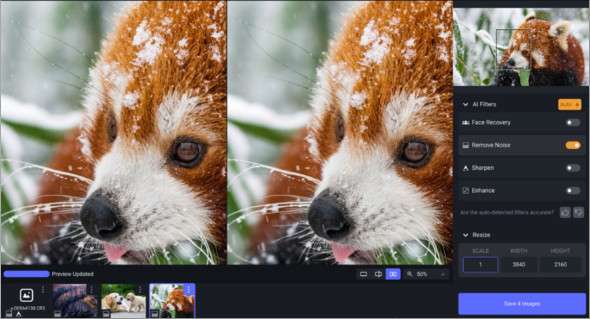
Topaz Photo AI is an AI-powered photo editing tool that lets you focus on the creative aspects of photography by enhancing the quality of your images. It can improve sharpness, remove noise, and increase the resolution of your photos using AI technology. You can also use ON1 Portrait AI.
AI is particularly effective at improving image quality. Topaz Photo AI offers world-class tools to create images that would otherwise be impossible. If you have blurry photos, you can use Topaz Photo AI to clean them up. The Sharpen AI module reverses the root causes of blur to achieve more natural results, rather than simply artificially boosting edge contrast.
Topaz Photo AI is available as a standalone application or as a plug-in for Adobe Photoshop and Lightroom and is compatible with Windows and Mac operating systems.
Key features of Topaz Photo AI:
– AI-powered photo editing tool to focus on the creativity of photography
– Get sharp, clear images without noise
– Accurately distinguishes between actual image details and noise with an astonishing level of precision
– Improves sharpness, removes noise and increases the resolution of your photos
– AI is particularly effective at improving image quality, but it cannot make creative decisions for you.
– Topaz Photo AI offers you world-class tools to create images that would not be possible without it
– The Sharpen AI module reverses the root causes of blur to achieve more natural results.
Version : 4.0.3 /Portable: 3.0.0
Language : English
Size : 915.61 MB / Portable: 7.22 GB
Configuration:
– Windows (x64 Bits): 10, 11
Compatible Applications:
– Adobe Photoshop CC2020 to CC2025
– Adobe Lightroom Classic CC2020 to CC2025
– Capture One Pro 20 to 23
Download Topaz Photo AI v4.0.3 (x64)
Download Topaz Photo AI Portable v3.0.0 + All models
This article was last updated on August 16, 2025