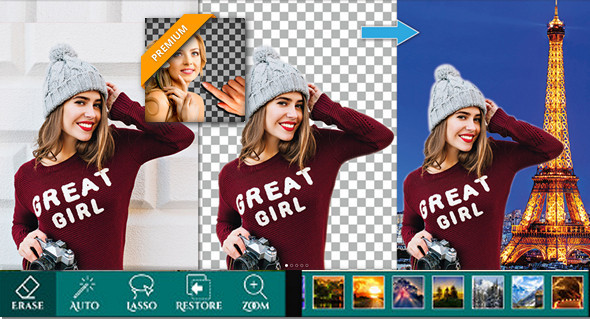
Ultimate Background Eraser provides a quick and easy way to change photo backgrounds. Simply tap the area you want to erase, and the automatic eraser tool will do the rest. You can also manually erase the background of your photos by tapping or using the Lasso tool (Image cutting).
Remove the background from your photos and save the transparent image in PNG or JPG format! The resulting images can be used as stamps with other applications to create a photo montage, collage, or with a beautiful background (use our backgrounds or your own).
Features:
Gallery
You can also choose the background image from your image folder.
Manual deletion
Background removal
Automatic deletion
This will erase your background and make it transparent to reveal the part of your image.
Crop Fashion
Snip your photo by drawing the outline.
Context
There are more than 20 backgrounds that can suit your cropped image.
Lasso Eraser (cut photos in OR cut photos)
Removing the selection background
Undo, redo, and zoom in
For an accurate result
Restore
Background extraction
Save and share
Save the image to a new location and share it on social media with your friends and family.
Version 1.8 Premium
Compatibility Android 4.1 or later
Size : 21.5 MB
This article was updated on January 8, 2018