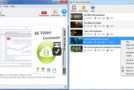
Ummy Video Downloader is a simple tool that lets you easily download videos from YouTube. The application comes with a user-friendly interface that makes downloading online clips easy, even for beginners. Simply paste a YouTube link, press "Download," specify the save location and quality, and then wait for the process to complete.
Video quality options depend on how the clips were uploaded. Note that you can download and save the video files, extract the audio stream, and convert it to MP3 format.
Regarding program options, you can specify the default save directory or have the tool prompt you for a new location each time you download files, choose the default video quality, show or hide Ummy Video Downloader from the taskbar and system tray, and switch to a different language for the graphical interface. These settings can be reset at any time.
The main drawback of Ummy Video Downloader is that it can only process one link at a time, meaning you'll waste a lot of time if you want to download many clips. On the other hand, it displays a list of all the videos it has processed, and you can browse the target folder or open them with your default video player with just a few clicks.
Configuration :
– Windows (x32/x64 Bits): XP, Vista, 7, 8, 8.1, 10
– Processor: 1 GHz
– RAM: 1 GB
Language : Multilingual (French not included)
Size : 20.9 MB
This article was updated on February 17, 2019