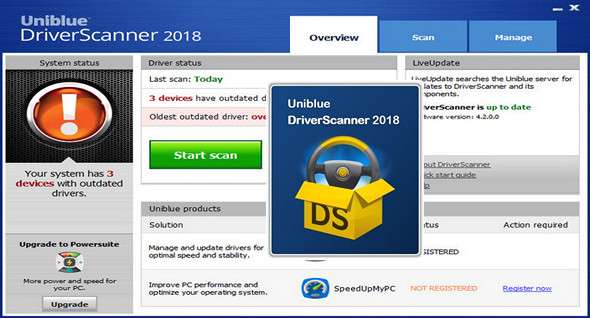
With DriverScanner you can download and install driver updates on your computer with a single click and unlock all the features of your system!
Outdated drivers can cause a range of problems, from reduced hardware functionality to conflicts and system crashes. Since Windows requires specialized drivers to run virtually every hardware component in your PC, keeping track of what needs updating, and downloading and installing the appropriate drivers, can be complicated and technically challenging.
While drivers can be updated manually, identifying outdated or superseded drivers can be time-consuming. Furthermore, locating the correct driver on the manufacturer's website, downloading, and installing it can be tedious and technically risky. Built with simplicity in mind, DriverScanner 2018 scans your computer to provide a list of drivers that need updating. With a single click, DriverScanner will safely install each update on your PC.
Updating your drivers ensures your hardware performs at its best. While the benefits depend on the specific driver you choose to update, driver updates generally offer one or more of the following advantages:
• Improved hardware compatibility and reduced system conflicts
• Improved and enhanced device performance
• Bugs removed and device errors
• New device features or unlocked features
• Improved computer performance and stability
DriverScanner offers other features:
• A new driver analysis engine for fast and frequent driver updates
• Fast and secure driver downloads
• Automatic restore points for maximum security
• One-click driver installations
• An elegant and easy-to-use interface
• Reliable technology from a Microsoft Gold Certified Partner
What's new ?
– User interface improvements
– Bug fixes
Configuration:
– Windows (x32/x64 Bits): 7, 8, 8.1, 10
– Processor: 1 GHz
– RAM: 1 GB
– Disk space: 20 MB
Language Multilingual (French included)
Size : 7.6 MB
This article was updated on January 14, 2018