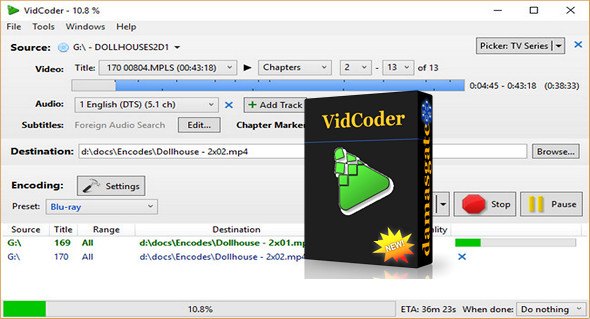
With the VidCoder application, you can easily rip and encode DVD/Blu-ray discs to your computer's hard drive. You simply choose a source, select your chapters, audio tracks, and subtitles, and configure the output formats. It uses HandBrake as its encoding engine.
Easy to use and with a pleasant interface, VidCoder allows you to encode in x234 (free encoder clone of H265) and therefore obtain good quality results in a few steps and offers you the possibility to check your video directly from its interface.
Functionality:
– Multi-threaded
– MP4, MKV containers
– H.265 encoding with x265, the world's best video encoder
– Fully integrated encoding pipeline: everything happens in a single process and there are no temporary files
– H.265, MPEG-4, MPEG-2, VP8, Theora video
– AAC, MP3, Vorbis, AC3, FLAC audio coding and AAC/AC3/MP3/DTS/DTS-HD passenger pass
– Target bitrate, size, or quality for the video
– 2-pass coding
– Decombine, detelecine, deinterlace, rotate, reflect filters
– Batch encoding
– Instant preview of sources
– Creates short, encoded preview clips
– Pause, resume encoding
Configuration:
– Windows (x32/x64 Bits): XP, Vista, 7, 8, 8.1, 10
– Processor: 1 GHz
– RAM: 512 MB
– Disk space: 50 MB
Facility :
– For Windows x64 installer: VidCoder-2.57-x64.exe
– For Windows x86 installation: VidCoder-2.57-x86.exe
Portable version:
– For Windows x64, run: VidCoder-2.57-x64-Portable.exe
– For Windows x86, run: VidCoder-2.57-x86-Portable.exe
Language Multilingual (including French)
Size : 48.0 MB
This article was updated on July 28, 2017