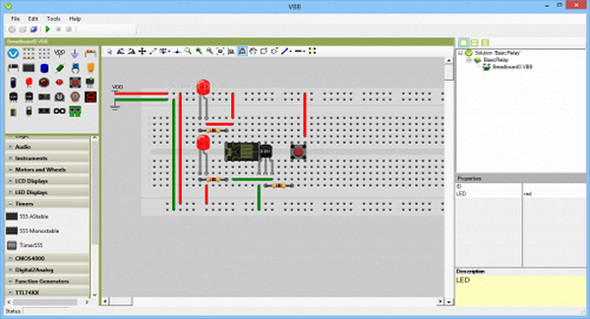
Virtual Breadboard is a powerful application that provides a microcontroller development environment and a breadboard emulator, as well as a microcontroller-based application development platform. The software is designed as an integrated circuit emulator that can also serve as a development environment for microcontrollers.
Virtual Breadboard allows you to emulate certain types of circuits, but it does not provide SPICE simulation and cannot be used to solve circuit-related problems. You can customize your selection with various components, including instruments, timers, function generators, motors, and LCD and LED displays.
The software comes with an intuitive and user-friendly interface that includes a large collection of circuit templates including Arduino samples, as well as more basic examples such as relays, HBridge demos, and more.
Main features:
– An intuitive interface that could be easily used by anyone who knows what they are doing.
– Allows you to choose from a rich collection of circuit designs or instead choose to create your own.
– Allows you to customize your project with different components (instruments, timers, function generators, motors, LCD/LED screens, etc.).
– Displays the error log while the circuit is being emulated so you can see what happened in real time.
– Allows you to use the terminal component to send UART commands at TTL levels.
– Perfect for teachers, students, and engineers
VBB 5.54 January 27, 2017:
* Fixed the Sketch Import function to enable it in VBB4Arduino
* Breaking change: Arduino IDE Monitor has been changed to monitor the project directory. Use the "Export compiled binary" function when using the Arduino IDE.
* Adding code templates when creating new Arduino projects
* Removal of the runtime errors tab
* Fixed the console in the console tab to work with simulation without an external device
* Added new DIP28 and DIP8 packages to ArduinoSim/Em peripherals
* Fixed EEPROM editor for Arduino Em
* Added a PIC16F84 watchdog timer and a full EEADR byte register
Configuration:
– Windows (x32/x64 Bits): XP, Vista, 7, 8, 8.1, 10
– Java JRE
– .NET Framework 4.0
– Processor: 1 GHz
– RAM: 512 MB
– Disk space: 20 MB
Facility :
– Standard installation, launch the file SetupVBB.msi
Language : English
Size : 14.7 MB
This article was updated on March 2, 2017