VSO ConvertXtoDVD 7 is software for converting your videos to DVD and watching them on any player. It allows you to convert AVI to DVD, DivX to DVD, WMV to DVD, RM to DVD, YouTube to DVD, etc., and automatically burns videos to DVD after conversion.
With ConvertXtoDVD, you can save your movies to DVD format on any DVD player in just a few clicks. The converter includes a conversion advice tool that will automatically apply the best quality settings based on the videos you've added to your project.
Create DVDs from various video formats to watch on your TV with any player. Add one or more video files, insert a blank DVD, and your videos will be automatically converted and burned with chapters and a stylish DVD menu. No external codecs are required.
The best quality with the fastest possible conversions is how VSO ConvertXtoDVD is developed to meet the needs of both beginner and advanced users.
VSO ConvertXtoDVD allows you to convert:
– AVI to DVD
– MKV to DVD
– MOV to DVD
– DivX to DVD
– WMV to DVD
– MTS and M2TS to DVD
– MPEG to DVD, MP4 to DVD
- and more
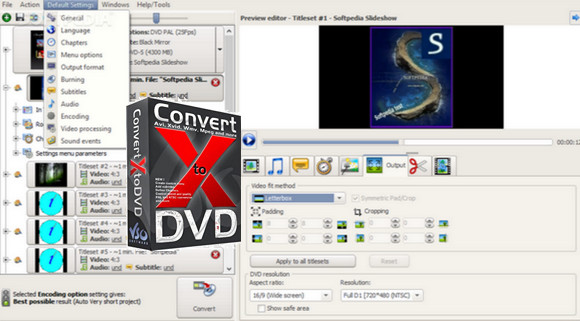
Create menus and chapters, cut videos, total customization with live preview.
Modify your project using the various settings and features listed below. Preview the results before converting!
– Create menus with videos and music
– Integrated video player for live preview
– Cut out the unwanted parts of the video
– Add chapters – automatic or custom
– Supported subtitle files
– Convert NTSC to PAL and vice versa
– Merge the function – as for CD1 + CD2
– Rotate the video, add brightness/contrast
Advanced settings for ultimate conversions:
– 2-pass encoding for better quality
– Hardware decoding for faster conversions
– Video/audio/subtitle synchronization
– Various audio output formats
– Image resizing filters (lanczos, linear, cubic, etc.)
– Multiple encoding profiles
– Optimized multi-core processor
– Audio amplifier
– Upholstery and culture
– Unraveling
– Batch Converter
– Multiple conversions processed simultaneously
– Quality Advisor
Burn to DVD, create an ISO file or store on PC.
Create standard DVD video files (Vob files) to ensure compatibility with all home DVD players.
– Compatible with all discs (see the Supported Formats tab)
– ISO output available
– NTSC + PAL region formats
– 16:9 widescreen + 4:3 fullscreen
– Burn multiple copies
– VSO combustion engine included
– Various SD resolutions available
– Custom output size
– Burn to DVD / USB drive or store on PC
Configuration:
– Windows (x32/x64 Bits): XP, Vista, 7, 8, 8.1, 10
– Processor: 1 GHz
– RAM: 512 MB
– Disk space: 100 MB
Facility :
1. Install the program vso_convertxtodvd_setup_7.0.0.26b
2. Copy the file patch.exe in the installation folder, launch it by administrator
Portable version:
Run the file Portable version\ConvertXtoDVD7Portable.exe
Language Multilingual (French included)
Size : 71.1 MB
This article was updated on March 8, 2017