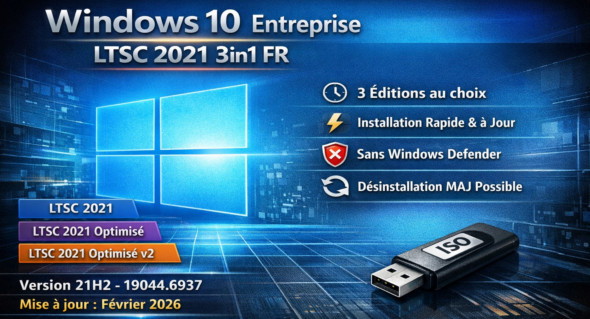
Windows 10 Enterprise LTSC 2021 3in1 FR – February 2026 is a professional version of Windows 10 designed for enterprise environments requiring stability, performance and long-term support.
This LTSC (Long-Term Servicing Channel) edition receives only security and stability updates, without frequent additions of new features, making it ideal for critical workstations, industrial environments, or sensitive infrastructures.
The 3in1 designation generally indicates that it groups three variants into a single installation image (e.g., different architectures or Enterprise editions).
French version (FR), updated until February 2026 with the latest cumulative fixes.
These ISOs include the following versions:
– Windows 10 Enterprise LTSC 2021
– Windows 10 Enterprise LTSC 2021 Optimized
– Windows 10 Enterprise LTSC 2021 Optimized v2
Following the latest cumulative update, we are now on v21h2 build 19044.6937
The goal of this ISO is to offer a choice between these 3 more or less optimized versions…
This also saves time for those who frequently need to install Win10 LTSC.
(as up-to-date as possible)!
And in case of a bug, it is now possible to uninstall the latest monthly update!
Basically, in LTSC (by default):
– No Cortana* (some files are present…)
– No Windows Store
– No colony programs installed anywhere
Changes made across the 3 editions:
– Integration of embeddable updates "except Defender" (as of Feb 2026)
– The .Net Framework 3.5 and 4.8.1 are already available 🙂
– Added a tag to the boot menu on the ISO
Modifications made ONLY to optimized editions:
Tweaks:
Classic GUI – Enabling the photo viewer (manually)
Desktop – The desktop icon is visible on the desktop.
Explorer – Disabling the list of recently opened programs
Explorer – Disabling user tracking
Explorer – Increased icon cache to 4MB
Explorer – Open File Explorer on (This PC)
Explore – Recent Document History (delete on close)
Explore – Recent Document History (Do not save)
Explorer – Removing the “3D objects” folder from the navigation pane
Explorer – Removing recent folders from the navigation pane
Explorer – Removing recent files from the navigation pane
Explore – Remove the “shortcut to…” suffix from created shortcuts
Explorer – Run in a separate process
Service – Disabling the “Wsearch and DiagTrack” services
System – Disabling the reserved system cache (~7GB)
System – Disabling automatic defragmentation (not certain…)
System – Disabling bandwidth limit
System – Enabling a larger system cache (HDD and SSD)
System – Improved disk check time (5 sec)
System – Improved system shutdown speed
System – Improved Windows shell response
System – Reduced launch time for desktop applications at startup
Basic telemetry is supposed to be pretty much completely disabled thanks to a script on MDL
Additional modifications made ONLY to the optimized v2 editions =>
Windows Defender -> Not available (Disabled)
Version : LTSC Enterprise 21h2 build 19044.6937
Language : French
Size : 4.72 GB
Download Windows 10 Enterprise LTSC 2021 3in1 Fr x64 (Feb 2026)
This article was last updated on February 22, 2026.