Windows 10 LTSC v1809 3in1 (x64) is primarily designed for businesses and even home desktop users to deliver high performance and efficiency. It includes numerous program changes and removals, as well as additions that won't affect many users.
This version is already activated until 2038. If you do not want this method (activation), delete the contents of the $OEM$ folder in the "sources" folder of the ISO.
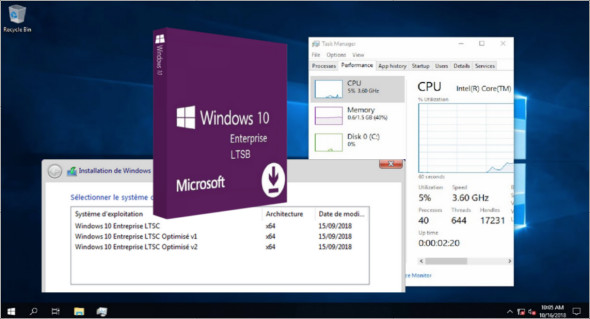
This ISO includes the following versions:
Windows 10 Enterprise LTSC x64
Windows 10 Enterprise LTSC x64 Optimized v1
Windows 10 Enterprise LTSC x64 Optimized v2
Basically, in LTSC by default :
– No Cortana (some files are present…)
– No Edge browser
– No Windows Store
– No colony programs installed anywhere
Changes made across the 3 editions:
– Integration of updates (security and cumulative as of April 12, 2019)
(with the exception of MRT and Windows Defender)
– The .Net framework 3.5 functionality is enabled by default on all editions.
(Sometimes, part of the cumulative update redownloads to finalize…)
Changes made only to the 2 optimized editions:
Classic GUI — Enabling the photo viewer (manually)
Desktop — The icon of the workstation visible on the desktop
Explorer — Disabling the list of recently opened programs
Explorer — Disabling user tracking
Explorer — Increased icon cache to 4 MB
Explorer — Open File Explorer on (This PC)
Explore — Recent document history (delete on close)
Explore — Recent document history (do not save)
Explorer — Removing the "3D objects" folder from the navigation pane
Explorer — Removing recent folders from the navigation pane
Explorer — Removing recent files from the navigation pane
Explore — Remove the "shortcut to…" suffix from created shortcuts
Explorer — Run in a separate process
System — Disabling bandwidth limit
System—Disable startup item delay
System— Enabling a larger system cache (HDD and SSD)
System — Improved disk check time (5 sec)
System—Improved system stopping speed
System—Improved Windows Shell Response
System—Reduced launch time for desktop applications at startup
Changes made only to the optimized v2 edition:
Windows Defender Application Guard—Disabled
Update & security—Hide Windows Defender section
File History Service — Disabled
Windows Defender Service — Disabled
Windows Defender Security Center Service — Disabled
Windows Defender System Guard Service—Disabled
Taskbar — Disabling the notification center
Taskbar — Disable notifications
Taskbar — Disabling the search bar (on the taskbar)
Configuration :
– Processor (x64): 2 GHz
– RAM: 2 GB
Language : French
Size : 3.30 GB
This article was updated on April 13, 2019