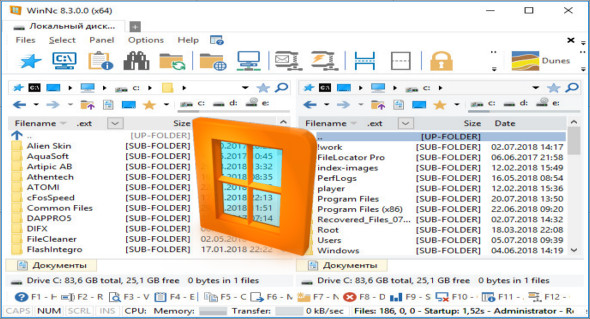
WinNC is a file manager designed to speed up file transfers with ease, serving the same purpose as Windows Explorer. With a new, flat Windows 10 interface, the software integrates standard file management functions such as moving, copying, deleting, formatting, compressing, decompressing, linking, and editing files. It includes tools for compressing, splitting, and encrypting files, eliminating the need for a separate decompression tool. It can also convert audio files (WAV to MP3), burn files to DVDs and audio CDs, create ISO files, create self-extracting .exe files, and synchronize your files.
WinNC uses color-coded indicators for file actions so you can see if a file is being copied (green), moved (orange), or loaded (yellow). It includes a built-in slideshow viewer, audio player, and video player for quick navigation of your media.
What's new ?
* Fixed installation issue with WinNCKey registration
* Issue WinNCKey in WinNC to open the directory
* URL opened in the fixed browser
* Supports 64px icons
* Improved DPI Scaling
Configuration:
– Windows (x64 Bits): 7, 8, 8.1, 10
– Processor: 1 GHz
– RAM: 1 GB
Language : Multilingual (French included)
Size : 15.1 MB
This article was updated on July 28, 2018