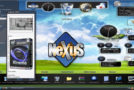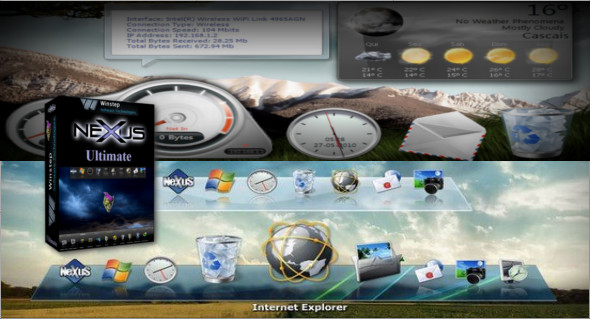
The Winstep Nexus Dock is a professional docking station for Windows. With Nexus, your most frequently used applications are at your fingertips. Nexus transforms your work on your computer into a fun and engaging experience.
Nexus Ultimate is an enhanced version of the free Nexus Docking Station, available as a standalone product or as a component of Winstep Xtreme (a single, easy-to-install package containing all of Winstep's popular desktop enhancement products for Windows).
Winstep Nexus Ultimate Features:
– Display running applications on the dock with task grouping, task filtering and icon customization options.
– Display the system status bar on the dock as individual or grouped icons.
– Blur-Behind (7/Vista) and the colorization of the docking station backgrounds.
– More than 80 special commands such as Sleep, Empty Recycle, CD Control, etc.
– Monitor active connections and bandwidth usage with the Net Meter module.
– Get weather forecasts for more than 39,000 cities worldwide.
– Monitor CPU and RAM usage, multiple mailboxes for incoming mail, and more!
– Multiple animated mouse effects: zoom, swing, bounce and many more!
– Live icon reflections and animated water-like effects.
– Quickly change the icons of shortcuts and running programs by dropping PNG and ICO image files directly into the icon.
– Built-in support for animated icons.
– Minimize windows to the dock.
– Multi-monitor support.
– Compatible with skins for all third-party docks.
– Multiple docks.
– Ability to group shortcuts into an unlimited number of nested sub-docks.
– Categorize applications into user-defined tabs on the tablet (tab dock).
– Increase productivity by displaying folders, the Desktop, My Computer, Control Panel and other virtual system folders as tabs on the shelf.
– Reduce clutter by hiding desktop icons and using the Desktop tab on the shelf instead.
– Change themes with one click via the special Themes tab on the shelf.
– Exclusive modules/widgets (e.g., battery monitoring module).
– Even more amazing mouse, launch and attention effects.
– Unlimited number of clock alarms and reminders.
– Customize the system tray with high-resolution icons.
– Automatic installations and updates via the Winstep Update Manager.
Powerful dock manipulation options (Nexus Ultimate)
Create docks from existing tabs, detach sub-docks, turn docks into sub-docks, duplicate docks, delete docks – all using simple drag-and-drop and/or context menu options.
Tablet/tabbed tablet (Nexus Ultimate)
The Winstep Shelf is not only capable of holding shortcuts, but it is also capable of displaying the contents of special Shell folders such as Desktop, My Computer, Control Panel, Recent Documents, etc., the contents of folders on your hard drive, which can then be manipulated by drag and drop as usual.
The shelf allows for a clean and uncluttered desktop, free of icons, by having Nexus Ultimate hide desktop icons – icons that can then be quickly accessed via the Desktop tab. Shelf tabs can also be assigned keyboard shortcuts so that the shelf simultaneously comes to the foreground and opens that particular tab.
Live Icon Reflections
The first (and only) Windows dock to display "live" icon reflections. The reflections update in real time if the icons animate or change. The reflection size is also user-configurable.
Object-based drag-and-drop power
The object-based interface offers drag-and-drop functionality that simplifies managing your applications, files, printers, and more. Use drag and drop to move, copy, or rearrange objects from one location to another. Drop documents onto Dock application objects and they'll load automatically. You can quickly change the images used by Nexus objects simply by dragging and dropping your favorite .ICO, .PNG, or .TIF files onto the desired object.
Special effects
Eye Candy is king! Lots of optional special effects such as icons zooming, bouncing, glowing, swinging, swaying, crushing, exploding, etc., moving to make room for items about to fall, bouncing on application launch, visual feedback for specific actions, fluid effects that make dockers and icons behave like liquid surfaces, sound events for cases where docks collapse and pop-ups or sub-dockers open, and much more!
More visual effects (Nexus Ultimate)
With Nexus Ultimate, you get even more amazing hover, launch and attention effects in addition to the vast selection already offered by the free version of the Winstep Nexus dock!
Virtual file system support
Allows you to drag special Explorer objects, such as Control Panel items and the My Computer icon, into docking stations.
Document thumbnails
Documents, images, and video files dragged onto a dock are displayed as thumbnails to facilitate their identification.
Blurry behind
Automatically blurs the background of semi-transparent docks (Vista and Windows 7 only).
Reserve screen space
They ensure that maximized windows do not overlap docks attached to the edges of the screen.
Built-in support for animated icons
Nexus has built-in support for animated icons. Animated icons in Winstep applications are as easy to use as any other icon: simply drop the PNG strip of the animated icon directly into a dock element and the icon will automatically begin animating.
Running applications
Nexus is a complete taskbar replacement with the ability to display running applications in the dock – with Windows 7 “Superbar” capabilities, including Aeropeek, even on Windows XP.
Customizing bin icons (Nexus Ultimate)
The system tray icons are originally small, 16x16 pixels, and can appear very blurry when displayed in the dock at larger sizes. Nexus Ultimate lets you customize the tray icons with high-resolution solutions to address this issue, including a set of high-resolution images for the system tray icons within the application.
Automatic masking
Docks attached to the edges of the screen can automatically hide on the edge of the screen and appear on demand.
Auto-Collapse
Floating docks (i.e., docks not attached to a screen edge) can shrink to a single control tile and degrade on demand.
Full support for multiple monitors
Docking stations can be anchored to any screen edge or left floating on any monitor.
Anchoring Modules/Docklets
Nexus offers eight useful modules (widgets) such as a talking digital/analog clock that synchronizes your time with time servers on the Internet, a recycler, an email checker that supports SSL and multiple email accounts, a weather module, CPU, Net and RAM Meters and Wanda, an animated "fortune cookie" fish!
Battery monitor (Nexus Ultimate)
Nexus Ultimate offers you an additional UPS/Battery Monitor module, with many more modules exclusive to Nexus Ultimate and Winstep Xtreme coming soon! The UPS/Battery Monitor module is capable of recording power events and executing user-specified actions when battery levels reach a certain threshold.
Internal commands
Internal commands are special commands that you can add to the shortcut as shortcuts: Hibernate, Disable Monitoring, Empty Recycle Bin, Show Start Menu, Language Bar, CD Control, Search IP Address and over 80 more!
Clock alarms and task scheduler
The alarms associated with the clock module allow you to display contextual reminders, wake up to music, or run programs at specific times, either once or periodically. The free version of Nexus supports a single alarm, while Nexus Ultimate supports an unlimited number of alarms.
Keyboard accelerators
Docks can be brought to the foreground and dock items launched via user-specified keyboard shortcuts.
Supports PNG, ICO and TIF files
Supports the use of PNG files as well as TIF and ICO for object images and bitmaps.
Complete customization
Virtually every aspect of each dock is customizable: from the size of the icon, to the size of the zoom, to the dock's behavior.
Quality and performance tested
Nexus has undergone extensive testing by thousands of dedicated users. This testing continues as part of our ongoing efforts to provide superior software to our customers.
Configuration:
– Windows (x32/x64 Bits): XP, Vista, 7, 8, 8.1, 10
– Processor: 1 GHz
– RAM: 1 GB
– Disk space: 100 MB
Language Multilingual (French included)
Size 46.3 MB
This article was updated on April 2, 2018